Reproducible modules with the lockfile
A Git tag can be force-moved to different bytes tomorrow. orchstep.lock pins each remote module to an immutable commit and content hash, so module verify in CI fails on supply-chain drift instead of running it.
blog/reproducible-lockfileversion: "^1.0.0" resolves to a tag like v1.1.0. Comforting — until you remember a tag is just a movable pointer. The module author (or someone with push access, or a compromised CI token) can force-move v1.1.0 to different bytes tomorrow, and your next build runs code you never reviewed. Your workflow file would not change. Your diff would be empty. The thing that ran would be different.
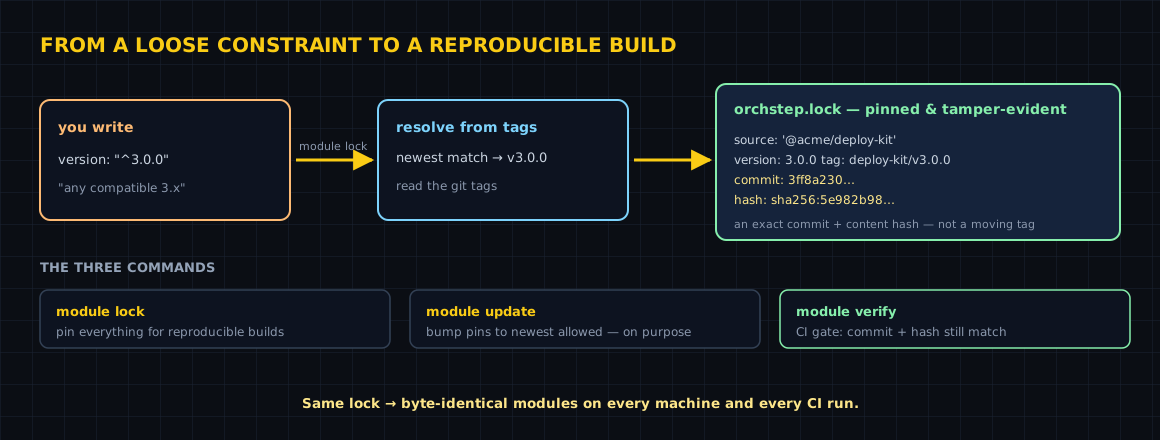
Every ecosystem that ships executable units solves this the same way: a lockfile. go.sum, package-lock.json, .terraform.lock.hcl, Cargo.lock. OrchStep's is orchstep.lock, and it turns "newest 1.x" into "exactly these bytes."
What gets pinned
Take a workflow that imports one remote module:
name: reproducible-lockfile
desc: "Pin remote modules to an immutable commit + content hash with orchstep.lock."

modules:
  - name: greeter
    source: "github.com/orchstep/test-module-single"
    version: "^1.0.0"                                   # resolves to v1.1.0

tasks:
  # `orchstep run hello`
  hello:
    desc: "Run a remote module — pinned by orchstep.lock"
    steps:
      - name: greet
        module: greeter
        task: hello
        with:
name: "OrchStep"Run module lock and OrchStep resolves the constraint and writes the lock:
orchstep module lock greeter pinned v1.1.0 tag v1.1.0 commit 8638d85ce4e0
Lock file written: orchstep.lockHere is the real orchstep.lock it produced — every field is load-bearing:
# orchstep.lock - Auto-generated, do not edit manually.
# Pins each module to an immutable commit + content hash for reproducible,
# tamper-evident builds. Written automatically on first resolve.
#   orchstep module update   refresh pins to newest allowed versions
#   orchstep module verify   re-check commit + hash (CI gate)

modules:
    greeter:
        source: github.com/orchstep/test-module-single
        version: 1.1.0
        tag: v1.1.0
        commit: 8638d85ce4e043c15de3143b3c4a9aa2b779d38e
hash: sha256:25b552a9e02b2fef3b962b0cc0fad85630b986575b27564964450d0363ca248c| Field | What it is | Why it matters |
|---|---|---|
source | where the module came from | identifies the import |
version | the resolved semver | human-readable record of ^1.0.0 → 1.1.0 |
tag | the Git tag matched | traceability back to the release |
commit | the immutable commit SHA | what actually gets fetched — not the tag |
hash | sha256 over the module's files | detects a tampered cache or a re-pointed commit |
The two that make it bulletproof are commit and hash. With a lock present, OrchStep fetches the pinned commit and ignores the tag entirely — so force-moving v1.1.0 does nothing to your build. Then it recomputes the content hash and compares. If the bytes do not match, the run fails instead of executing.
Verify in CI — the gate that earns its keep
module lock writes the pins. module verify enforces them: it re-fetches every locked module at its pinned commit, recomputes the hash, and exits non-zero on any drift.
orchstep module verifyAll modules verified: commit + content hash match orchstep.lockDrop that one line into your pipeline before anything runs, and a moved tag or a tampered module turns into a red build, not a silent code-swap:
steps:
  - uses: orchstep/setup-orchstep@v1
  - run: orchstep module verify        # fails the build on supply-chain drift
- run: orchstep run deployIf the upstream tag is force-moved to different bytes, verify says so in plain language:
module 'greeter' failed integrity check: orchstep.lock expects sha256:25b5...
but resolved content is sha256:1c9d... (the tag may have been force-moved or
the cache tampered; run 'orchstep module update' if this change is intended)To forbid implicit lock writes in automation entirely, set ORCHSTEP_LOCK_AUTOWRITE=false — CI then resolves against the committed lock and refuses to write a new one.
Upgrading on purpose
A lockfile is not a freeze. When you want a newer version, module update re-resolves to the newest version your constraint allows and re-pins the commit + hash:
orchstep module update greeter   # bump 'greeter' to newest allowed, re-pin
git add orchstep.lock # review the commit + hash change in the diffBecause the change lands as a commit + hash diff in orchstep.lock, a reviewer sees exactly which bytes changed — the property a security or platform team asks for before approving an upgrade.
The three commands, in one table
| Command | What it does | When |
|---|---|---|
module lock | resolve + write orchstep.lock; keep existing pins, fill missing | once, then commit it |
module update [name...] | re-resolve to newest allowed and re-pin | intentional upgrades |
module verify | re-fetch pinned commit, recompute hash, exit non-zero on drift | every CI run |
What you gained
| Concern | Tag only | With orchstep.lock |
|---|---|---|
| What runs tomorrow | whatever the tag points at | the pinned commit, always |
| Force-moved tag | silently runs new code | verify fails the build |
| Tampered cache | undetected | hash mismatch caught |
| Upgrades | invisible | a reviewable commit + hash diff |
| Teammate parity | "works on my branch" | identical resolution from the lock |
The honest boundary
Local-path modules (./mod, ../shared) are never locked — there is nothing remote to pin, and the files are already in your repo and your diff. The lockfile only earns its place once you import a remote module, which is exactly when the mutable-tag problem appears. And like any lockfile, it is only as good as your habit of committing it and gating CI on verify. Skip the gate and you have a pin nobody checks.
Where to go next
- Lockfile & Supply Chain — the full reference, including
ORCHSTEP_LOCK_AUTOWRITE - Using Modules — sources, constraints, and the CLI
- Registry & Scopes — how a source resolves to a repo + tag
- Modules, end to end — the concept tour
Importing a remote module in CI? Run orchstep module lock, commit the file, and add orchstep module verify to the pipeline. Three minutes now buys you a build that can't be swapped out from under you.
curl -fsSL https://orchstep.dev/install.sh | sh