A company module registry: share modules across teams
Map a company scope to one monorepo and every team imports the same versioned modules by @scope/name. The open way uses a registries: block; the managed way is OrchStep Pro's private registry.
blog/company-module-registryYou are the platform engineer, and you have the same conversation every month. A team has reinvented the deploy task, or the SBOM step, or the "wait for the rollout to go healthy" loop — slightly wrong, slightly different from the four other versions. You want one blessed implementation that every team imports and nobody forks.
A single remote module (point a source at a Git URL) solves one shared task. But platform teams do not ship one module — they ship a catalog. For that you want a scope: @yourco/deploy, @yourco/sbom, @yourco/notify, all coming from one repo, all versioned independently. That is what a registry gives you.
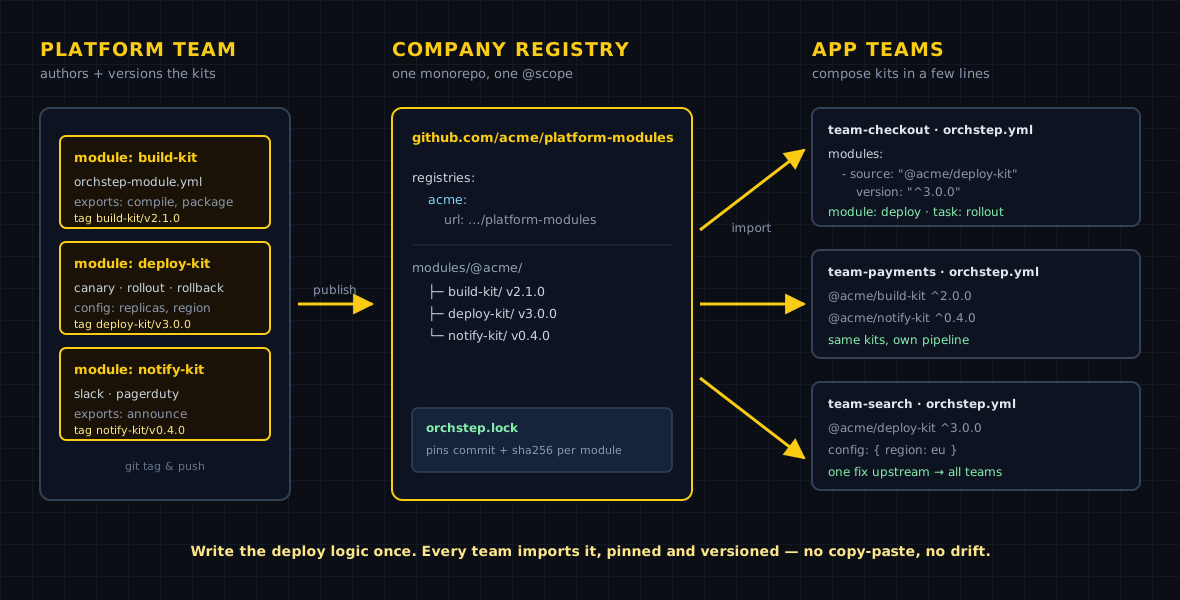
Map a scope to your monorepo
A custom registry is a top-level registries: block that maps a scope name to a Git repo. The map key is the scope without the leading @. Once mapped, every @yourco/<name> source resolves into that repo at modules/@<scope>/<name>/, with versions from <name>/vX.Y.Z tags.
Here is a runnable example against a real public monorepo:
name: company-module-registry
desc: "Share modules across teams: map a scope to your monorepo, then import @scope/<name>."

# Map your company scope to the monorepo that holds every shared module.
# The map key is the scope WITHOUT the leading @ (here: mycompany).
registries:
  mycompany:
    url: github.com/orchstep/monorepo-multi-modules

modules:
  - name: greet
    source: "@mycompany/module1"   # -> modules/@mycompany/module1, tag module1/vX.Y.Z
    version: "^1.0.0"

tasks:
  # `orchstep run main`
  main:
    desc: "Call a task from a shared monorepo module"
    steps:
      - name: hello
        module: greet
        task: greet
        with:
name: "OrchStep"The repo layout that backs this is the same one every built-in scope uses:
github.com/orchstep/monorepo-multi-modules
└── modules/
    └── @mycompany/
        ├── module1/        # tags: module1/v1.0.0, module1/v2.0.0, ...
        ├── module2/        # tags: module2/v1.0.0, ...
└── module3/Each module is versioned on its own tag track (module1/v1.0.0), so the deploy module can ship v3 while the notify module is still on v1. One repo, independent release cadences.
Resolve it for real
The custom @scope only means something inside a workflow that carries the registries: block — that is where the scope-to-repo mapping lives. Run module lock from the demo directory and watch @mycompany/module1 resolve to a real tag, commit, and hash:
orchstep module lock greet pinned v1.0.0 tag module1/v1.0.0 commit 3ff8a2302f1f
Lock file written: orchstep.lockAnd running it pulls the module's exported task straight from the monorepo:
orchstep run main🔒 Using locked version for 'greet': 1.0.0 (tag: module1/v1.0.0, commit: 3ff8a2302f1f)
📦 Loaded module 'greet' from '@mycompany/module1'
Workflow: company-module-registry
Task: main
Step: hello
$ echo 'Hello, OrchStep! (module1 v1.0.0)'
Hello, OrchStep! (module1 v1.0.0)
[ok] hello
Result: successGotcha worth internalizing: the scope is only known where the
registries:block is. A bareorchstep module resolve @mycompany/module1with noregistries:config in scope errors withunknown registry scope. Put the block in the workflow (or in anorchstep_config.ymlnext to it) and resolution just works.
What this buys the platform team
| Concern | Ad-hoc copies | Company registry |
|---|---|---|
| One blessed implementation | every team forks it | @yourco/<name> from one repo |
| Independent versioning | all-or-nothing | per-module <name>/vX.Y.Z tags |
| Discovery | Slack archaeology | module search, browse the monorepo |
| Upgrade control | edit each consumer | bump the version: constraint |
| Reproducibility | "works on my branch" | module lock pins commit + hash |
For your own org, swap the registry URL for your monorepo (github.com/your-org/platform-modules) and tag your modules <name>/vX.Y.Z. That is the entire open, self-hosted path — no service to run, no license, just a Git repo and tags.
When you want it managed: OrchStep Pro's private registry
The registries: approach has one constraint: module fetching uses anonymous Git, so the monorepo has to be reachable without credentials. That is fine for a public platform-modules repo, but most enterprises want their catalog closed — private by default, access-controlled, and managed without standing up and securing a shared Git repo for it.
That is what the OrchStep Pro private registry is for. It is a license-gated, local private registry with its own publish/list flow:
orchstep module publish ./deploy-kit     # publish into your private registry
orchstep module list-private             # list what's published
orchstep module export-private deploy # export a published moduleConsumers then import @yourco/deploy the same way they import any scope — the difference is the registry behind it is private and managed rather than a public Git repo.
These commands are Pro features. Without a license the binary is explicit about it:
This is an OrchStep Pro feature (the execution engine is always free).
What Pro includes: https://orchstep.dev/pro
Have a license key? Run: orchstep license activate --key=ORCH-...To be clear about the line: the engine and every open module feature — local modules, remote Git modules, public @scope registries via registries:, the lockfile, and module validate / install / search — are free and always will be. The private registry (publish / list-private / export-private) is the managed, closed option for orgs that do not want to host the catalog themselves. Details and pricing are on the Pro page.
The honest boundary
A registry is for many shared modules. If your org shares exactly one task today, a single remote Git module (the previous post) is less ceremony — graduate to a scope when the catalog grows past two or three. And if your platform-modules repo can be public, the open registries: path needs nothing from Pro. Reach for the private registry when "closed and managed" is a hard requirement, not a nice-to-have.
Where to go next
- Registry & Scopes — tiers, custom registries, tag formats, the cache
- Using Modules — every source form and the CLI
- Reproducible modules with the lockfile — pin the resolved commit + hash
- Modules, end to end — the concept tour
- OrchStep Pro — the managed private registry and what else is included
Tired of being the human registry in your org's Slack? Map one scope to one repo and let teams import. The block above is the whole open path.
curl -fsSL https://orchstep.dev/install.sh | sh