Using Modules
Import, install, version, and call modules — with runnable examples
This is the consumer guide: every way to reference a module, the CLI commands, version constraints, and how cached modules resolve. Every example here uses a real, public module repo, so you can run them as-is.
Sourcing a module
1. Built-in registry scope
@orchstep, @community, and @ai are built in — they resolve to the public
OrchStep registry repo with no configuration. Modules live at
modules/@<scope>/<name>/ and are tagged <name>/vX.Y.Z.
modules:
  - name: clone
    source: "@community/github_action_git-checkout"
    version: "^1.0.0"

tasks:
  main:
    steps:
      - name: checkout
        module: clone
        task: checkout
        with:
          repository: "https://github.com/org/repo.git"
          path: repo
ref: main2. Full Git URL (single-module repo)
Point source: at any Git repository. The whole repo is the module — its
orchstep-module.yml / orchstep.yml live at the repo root, and versions come
from vX.Y.Z tags.
modules:
  - name: greeter
    source: "github.com/orchstep/test-module-single"   # tags: v1.0.0, v1.1.0, v2.0.0
    version: "^1.0.0"                                   # resolves to v1.1.0

tasks:
  main:
    steps:
      - name: hi
        module: greeter
        task: hello
        with:
name: "OrchStep"3. Custom registry (your own monorepo)
To host many modules in one repo under your own scope, map the scope to the
repo with a registries: block. Modules live at modules/@<scope>/<name>/ and
are tagged <name>/vX.Y.Z — exactly like the built-in scopes.
registries:
  mycompany:
    url: github.com/orchstep/monorepo-multi-modules

modules:
  - name: greet
    source: "@mycompany/module1"
    version: "^1.0.0"
  - name: calc
    source: "@mycompany/module2"
    version: "^1.0.0"
  - name: fmt
    source: "@mycompany/module3"
    version: "^1.0.0"

tasks:
  main:
    steps:
      - { name: a, module: greet, task: greet, with: { name: "OrchStep" } }
      - { name: b, module: calc,  task: add,   with: { a: "2", b: "3" } }
- { name: c, module: fmt, task: upper, with: { text: "hello" } }The
registries:map key is the scope without the@(mycompany), referenced as@mycompany/.... You can override a tag template withtag: "{module}/v{version}"(the default).
Calling a module's tasks
Import modules in the modules: block (giving each a local name: alias), then
call their exported tasks from a step with module: + task::
modules:
  - name: greeter
    source: "github.com/orchstep/test-module-single"
    version: "^1.0.0"

tasks:
  main:
    steps:
      - name: run_it
        module: greeter          # the alias from modules:
        task: hello              # an exported task
        with:                    # task parameters
name: "World"- Pass parameters with
with:. - Provide module config (its
config.schema) with aconfig:block on the import. - Use the dedicated
module:+task:keys — a dottedtask: greeter.hellois not valid.
Module context modes: library vs configured instance
A module can be called two ways, and you pick per call:
- As a library (the default) — the caller injects the data (
with:/env:/ importconfig:); the module is reusable logic with fallbackdefaults:. - As a configured instance — the module is self-contained and ships its OWN
config:
environments/<profile>vars, adotenv:, and anenv:block. You select a profile and the module loads its own config.
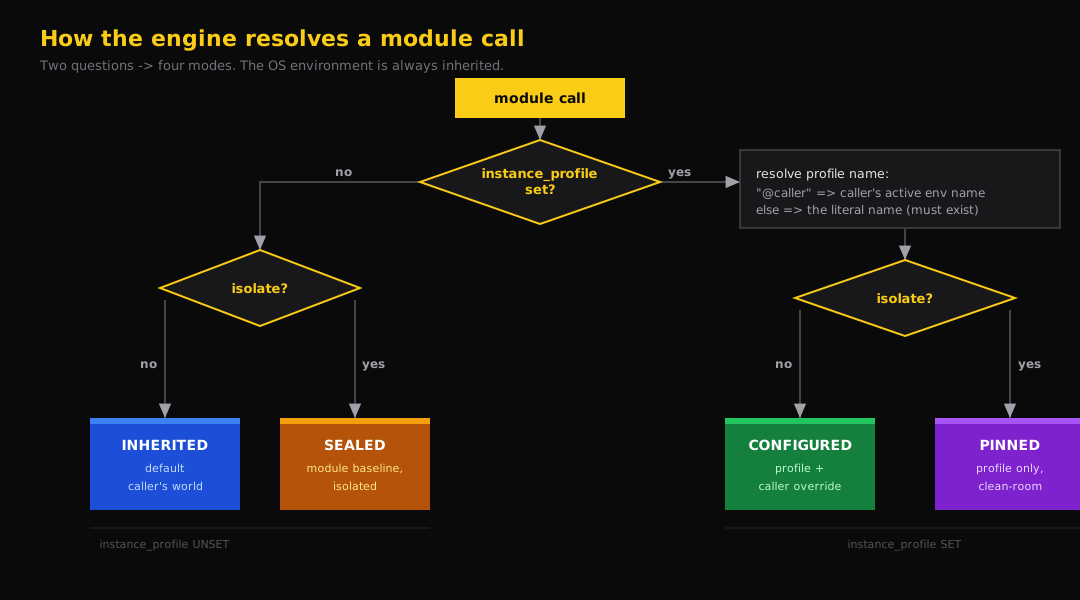
Two call-step knobs select the mode:
instance_profile: <name>— load the module's ownenvironments/<name>(plus itsdotenv:andenv:), resolved relative to the module. Template-resolved; use"@caller"to follow the caller's active environment name.isolate: true— clean-room: exclude the caller's context and overrides (with:/env:/ importconfig:). The OS environment is always inherited.
isolate: false | isolate: true | |
|---|---|---|
no instance_profile | Inherited — caller drives (default) | Sealed — module's own baseline, isolated |
instance_profile: p | Configured — profile p, caller can override | Pinned — profile p, clean-room |
tasks:
  deploy_all:
    steps:
      # Library call — caller drives.
      - { module: notifier, task: send, with: { message: "starting" } }

      # Configured instance — the module loads its OWN prod profile + dotenv + env.
      - { module: billing, task: migrate, instance_profile: prod }

      # Pinned — exact prod instance, ignores anything from the caller.
      - { module: billing, task: migrate, instance_profile: prod, isolate: true }

      # Fan out: one --env drives each module's OWN same-named profile.
- { module: billing, task: migrate, instance_profile: "@caller" }What loads, low → high precedence:
| Layer | Inherited | Configured | Sealed | Pinned |
|---|---|---|---|---|
| OS environment | yes | yes | yes | yes |
module defaults: | yes | yes | yes | yes |
module environments/<profile> | – | yes | – | yes |
module dotenv: / env: | – | yes | yes | yes |
caller --env vars | yes | – | – | – |
caller overrides (with: / env: / config:) | yes | yes | – | – |
Everything a configured instance loads is scoped: its profile vars and dotenv
unwind when the module returns, so two instances of the same module in one run (a
monorepo fan-out) stay independent, and nothing leaks into the caller's later steps.
A named instance_profile the module does not declare fails fast.
Inherited is unchanged. A plain
module:+task:call (noinstance_profile, noisolate) behaves exactly as before — the module's ownenvironments//dotenv:/env:are loaded only when you opt into instance mode.
CLI commands
module install — fetch into the cache
Accepts a built-in scope, a custom scope, or a full Git URL, with an optional
@version (or a second argument):
orchstep module install @community/github_action_git-checkout
orchstep module install github.com/orchstep/test-module-single@v1.0.0
orchstep module install github.com/orchstep/test-module-single ^1.0.0Modules are fetched into ~/.orchstep/cache/modules/. (Custom @scope sources
need their registries: config available, e.g. in orchstep_config.yml.)
run --module — run a task without a workflow file
# List exported tasks, their params, and a copy-paste command
orchstep run --module @community/github_action_git-checkout --list-tasks

# Run a task directly
orchstep run --module github.com/orchstep/test-module-single hello --var name=OrchStepGreat for one-off tasks and CI bootstrap (e.g. replacing actions/checkout@v4).
module resolve / module info — inspect versions
orchstep module resolve @orchstep/demo-validate-json          # which version a constraint selects
orchstep module info github.com/orchstep/test-module-single # git URL, scope, sub-path, available versionsmodule search — find registry modules
orchstep module search git-checkout
# @community/github_action_git-checkout v1.0.0 Clone Git repos ... [community]module validate — check a local module directory
orchstep module validate ./my-module/            # structural checks; supply-chain issues are warnings
orchstep module validate ./my-module/ --strict # supply-chain issues become errors (the @ai submission gate)module lock — pin exact versions {#lockfile}
orchstep module lock # resolve every imported module and write orchstep.lockorchstep.lock records the exact version, tag, and source for each module so
teammates and CI get identical resolutions. Commit it.
# orchstep.lock (auto-generated)
modules:
    greeter:
        source: github.com/orchstep/test-module-single
        version: 1.1.0
        tag: v1.1.0
commit: ""module cache — manage the local cache
orchstep module cache path     # print the cache directory
orchstep module cache clean # remove all cached modulesThere is no
orchstep module listcommand — usemodule cache pathto find cached modules, ormodule info <source>to inspect a specific one.
Version constraints
| Constraint | Matches | Example |
|---|---|---|
1.2.3 | exact | only 1.2.3 |
^1.2.0 | >=1.2.0 <2.0.0 | 1.2.0, 1.9.9 |
~1.2.0 | >=1.2.0 <1.3.0 | 1.2.0, 1.2.99 |
>=1.2.0 | minimum | 1.2.0, 2.0.0 |
* | highest available | latest tag |
The @version suffix on module install accepts a v-prefixed exact version
(@v1.2.0) or any constraint (@^1.0.0).
Where modules are cached
~/.orchstep/cache/modules/<repo-path>/@<scope>/<name>/v<version>/   # scope/monorepo
~/.orchstep/cache/modules/<repo-path>/v<version>/ # single-module repoThe scope is part of the cache key, so @orchstep/x and @community/x never
collide even though both resolve to the same registry repo.
Next steps
- Creating Modules — author and publish your own
- Registry & Scopes — how scopes, tiers, and layouts resolve