An end-to-end platform: golden-path modules for the whole org
A platform team publishes build, deploy, and notify kits to a registry. Dozens of app teams compose them in a few lines and ship the same way. This is the whole modules series in one runnable workflow — sources, scopes, versions, and a graph you can see.
blog/golden-pathsEvery platform team has the same recurring nightmare: forty repos, forty slightly-different deploy pipelines, and a security requirement that has to land in all of them by Friday. Each app team copied a "good" pipeline once, then drifted. There is no single place to make the change, because there is no single thing — just forty forks of an idea.
This is the post the rest of the Reusable Modules series was building toward. We've covered composing workflows like Lego bricks, the three trust tiers, how to design a module that doesn't rot, and running a private registry for your org. Now we put it together: a platform team owns a small set of golden-path modules, every app team composes them, and one change to a kit reaches everyone.
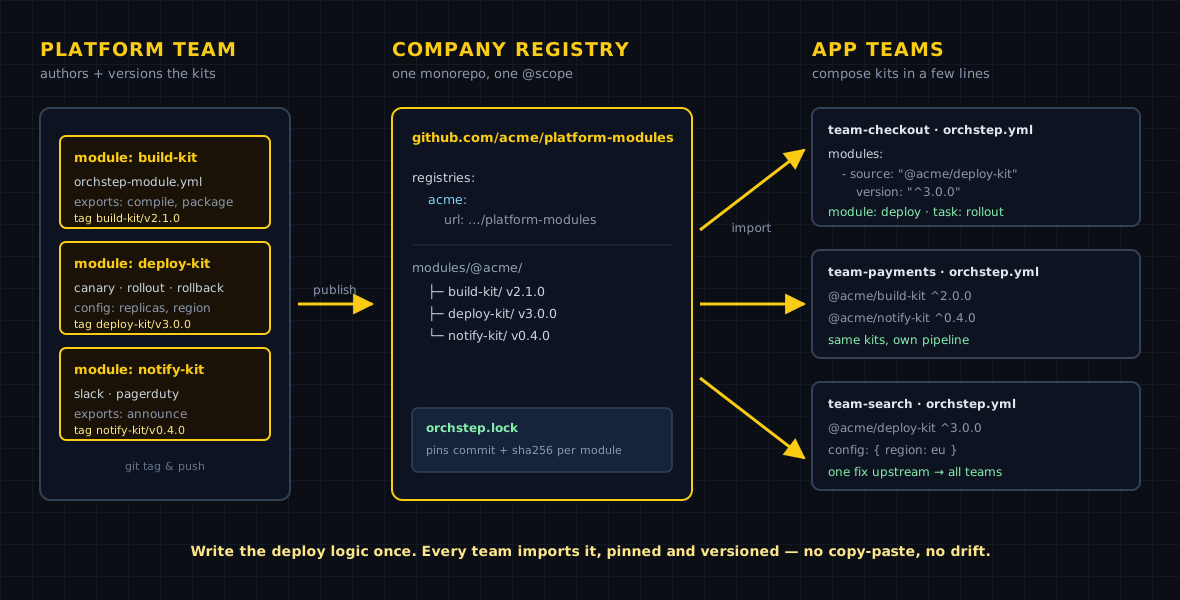
Who talks to whom
The shape above is the whole model. A platform team publishes versioned kits — build-kit, deploy-kit, notify-kit — to a registry. App teams don't fork them; they depend on them by @scope and semver constraint. The platform team ships a fix as a new tag, and every team on a compatible constraint picks it up on their next run. The arrows only point one way, and there's exactly one source of truth per capability.
The app team's side: a few lines
Here's what an app team writes. Three kits imported, one release task that composes them. The whole pipeline — build, scan, roll out, announce — is the platform team's logic; the app team supplies its service name.
name: platform-golden-path
defaults:
  service: "checkout"
  target: staging

# The platform team owns these kits. App teams compose, never fork.
modules:
  - { name: build,  source: "./modules/build-kit" }
  - { name: deploy, source: "./modules/deploy-kit" }
  - { name: notify, source: "./modules/notify-kit" }

tasks:
  # `orchstep run release --var service=payments`
  release:
    desc: "Ship a service down the org golden path"
    steps:
      - { name: ci,       module: build,  task: ci,       with: { service: "{{ vars.service }}" } }
      - { name: rollout,  module: deploy, task: rollout,  with: { service: "{{ vars.service }}", target: "{{ vars.target }}" } }
- { name: announce, module: notify, task: announce, with: { service: "{{ vars.service }}" } }The demo uses local module folders so it runs anywhere. Run it:
orchstep run release --var service=payments📦 Loaded module 'build' from './modules/build-kit'
📦 Loaded module 'deploy' from './modules/deploy-kit'
📦 Loaded module 'notify' from './modules/notify-kit'
Workflow: platform-golden-path
Task: release
Step: ci
...
[ok] ci
Step: rollout
...
[ok] rollout
Step: announce
...
[ok] announce
Result: successFrom local folders to a registry
To go org-wide, the platform team publishes the kits and the app teams swap the source — the tasks: block doesn't change at all. Only the resolution does:
modules:
  - { name: build,  source: "./modules/build-kit" }
  - { name: deploy, source: "./modules/deploy-kit" }
- { name: notify, source: "./modules/notify-kit" }registries:
acme:
url: github.com/acme/platform-modules
modules:
- { name: build, source: "@acme/build-kit", version: "^2.1.0" }
- { name: deploy, source: "@acme/deploy-kit", version: "^1.2.0" }
- { name: notify, source: "@acme/notify-kit", version: "^0.4.0" }The registries: block maps the acme scope to the repo; modules live at modules/@acme/<name>/ and ship as tags like deploy-kit/v1.2.0. A ^1.2.0 constraint means "the highest compatible 1.x," so that Friday security fix in build-kit reaches all forty teams on their next run — no PRs to forty repos. For reproducible builds, each consumer commits an orchstep.lock that pins every module to an exact commit and content hash; orchstep module verify is the CI gate that fails the build if a pinned module ever drifts.
See the whole platform as a graph
The payoff of composing instead of copy-pasting: the assembled pipeline is a structure you can look at, not 300 lines of bash to read. Drop the workflow into the visualizer and the composition renders as a graph — every called module task, every step, every branch:
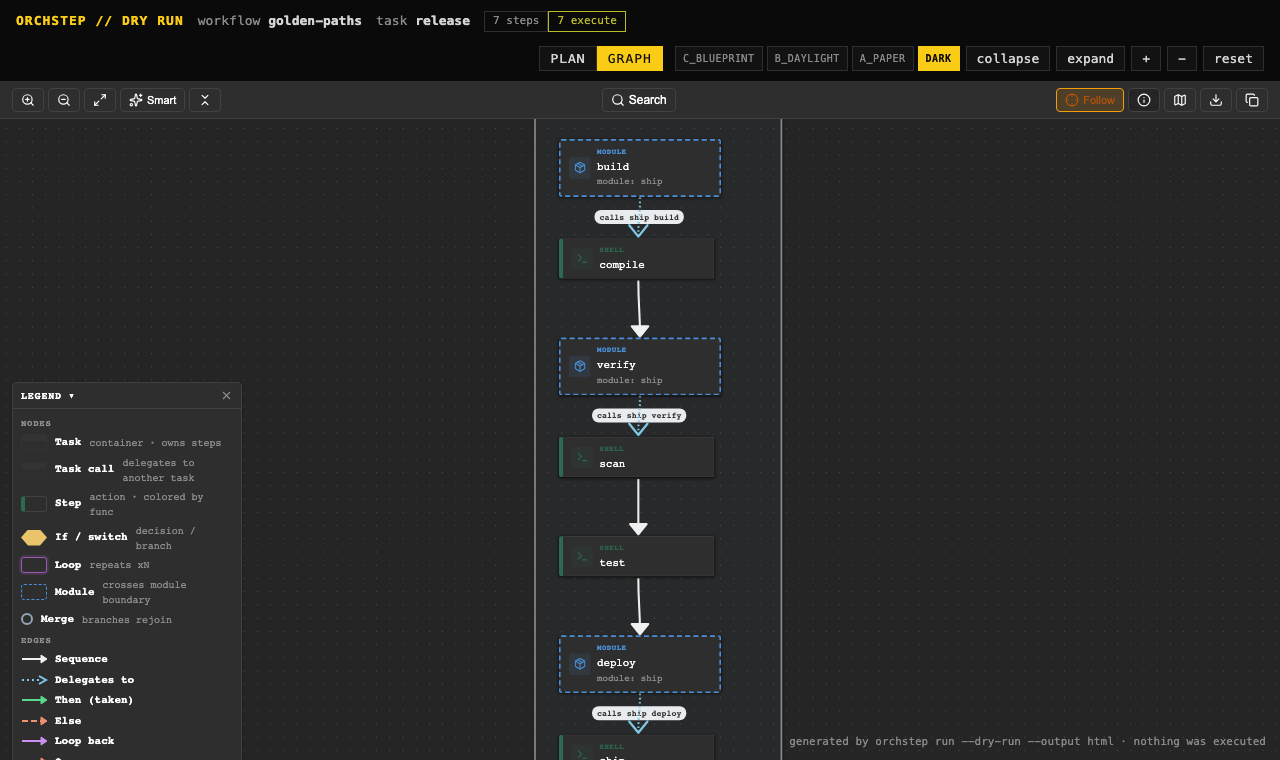
This is the same view your team gets live: orchstep serve launches a local web dashboard that renders the flow, shows each run, and lets you drill into per-step context. A new engineer can see how the org ships before they've read a single line of YAML — and orchstep run release --dry-run resolves the entire multi-module assembly and prints the plan without executing anything.
What you gained
| Concern | Forty forked pipelines | Golden-path modules |
|---|---|---|
| Source of truth | forty repos | one registry per capability |
| Shipping a fix to everyone | forty PRs | one tag, picked up by ^ constraints |
| Reproducibility | "whatever main was" | orchstep.lock + module verify |
| Onboarding | read forty pipelines | one graph, one golden path |
| Drift | inevitable | the constraint is the contract |
| App-team effort | own the whole pipeline | compose in a few lines |
The enterprise option
The demo above is entirely free: the engine and every open module feature — local modules, remote Git sources, the public @scope registries, the lockfile, validate/install/search — ship in the open binary. For modules you can't host publicly, OrchStep Pro adds a private registry: orchstep module publish pushes a kit to an on-disk registry, module list-private shows what's there, and teams consume it as @yourco/<name> exactly like the public scopes. That's the bridge for internal kits that can't live in a public repo. See Pro Features.
Where this isn't the answer
A platform of golden-path modules earns its keep when many teams ship the same shape of thing. If you're one team with one service, this is over-engineering — keep your pipeline as plain tasks and revisit when a second team wants the same thing. And remember the current limit: the open resolver fetches over anonymous Git, so public-repo registries or the Pro @private/ scope are your options for shared kits today.
Where to go next
- Using Modules — sources,
@scoperegistries, version constraints - Creating Modules — author and publish your own kits
- Lockfile & Supply Chain — pin, verify, and trust what you ship
- The Web Dashboard — see runs and flows live
- Visualizer — render any workflow as a graph
Forty repos drifting from one good idea? Publish the idea as a kit, tag it v1.0.0, and let every team depend on ^1.0.0 instead of forking it.
curl -fsSL https://orchstep.dev/install.sh | sh