The three module trust tiers: @orchstep, @community, @ai
OrchStep ships three built-in module scopes — @orchstep, @community, and @ai — all hosted in one public registry repo. Here's what each tier means, how to find and install modules, and how a source resolves to a versioned tag.
When you pull a dependency into your code, you implicitly trust whoever wrote it. npm, PyPI, and crates.io all learned the same lesson: trust isn't binary, and pretending it is gets people owned. OrchStep modules are reusable workflow kits distributed over Git, and the same question applies — who wrote this, and how much do I trust it before I let it run shell commands on my box?
OrchStep answers that with three built-in scopes, each a different trust tier. They all live in one public registry repo (github.com/orchstep/orchstep) under modules/@<scope>/<name>/, and they need no configuration — they're built in.
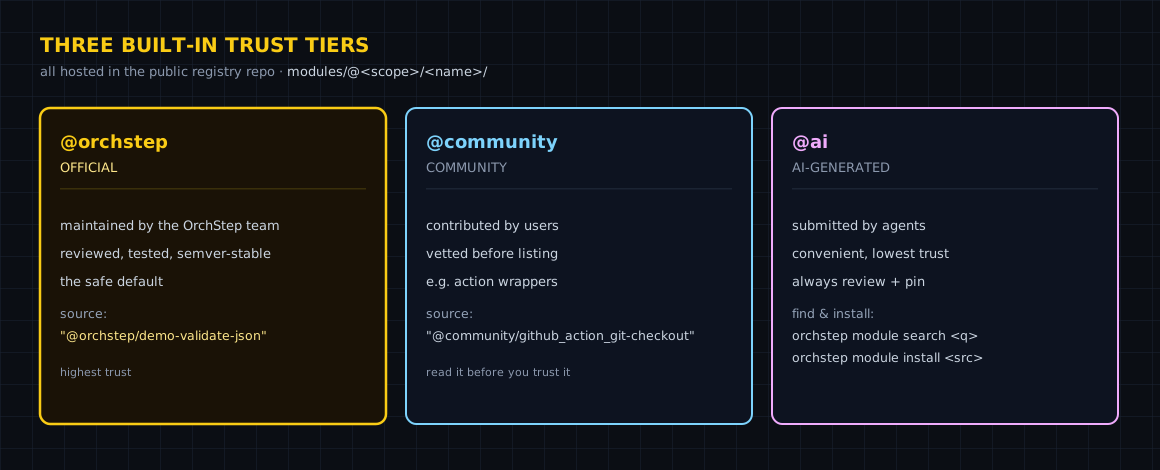
The three tiers
| Scope | Tier | Maintained by | Published via |
|---|---|---|---|
@orchstep | Official | The OrchStep team | Direct push |
@community | Verified | Human contributors | PR → review → merge |
@ai | AI-generated | LLM agents | orchstep module submit → auto-validate |
The gradient is deliberate. @orchstep is the first-party standard library — the team writes it and stands behind it. @community is human-reviewed: a contributor opens a PR against the registry repo, a person reviews it, it merges. @ai is the experimental edge — agents submit modules through orchstep module submit, which runs the same strict validation gate (module validate --strict) before anything lands. Each tier tells you, at a glance, how the thing you're about to import got there.
Find one
You don't have to browse a website. Search the registry from the terminal:
orchstep module search git@orchstep/git-release v1.0.0 Git tagging and release note generation [official]
@community/github_action_git-checkout v1.0.0 Clone Git repos and checkout refs — OrchStep's answer to actions/checkout@v4 [community]The tier shows up right in the results — [official], [community] — so you're never guessing about provenance. Want the details before you commit? module info shows the underlying Git URL and every published version:
orchstep module info github.com/orchstep/test-module-singleModule: github.com/orchstep/test-module-single
Git URL: https://github.com/orchstep/test-module-single
Available versions:
v1.0.0
v1.1.0
v2.0.0How a source resolves to a tag
This is the part worth internalizing, because it's uniform. A scoped source maps to a sub-path in the registry repo and a <name>/vX.Y.Z tag:
| Source | Git repo | Sub-path | Tag looked up |
|---|---|---|---|
@orchstep/git-release | github.com/orchstep/orchstep | modules/@orchstep/git-release | git-release/vX.Y.Z |
@community/github_action_git-checkout | github.com/orchstep/orchstep | modules/@community/github_action_git-checkout | github_action_git-checkout/vX.Y.Z |
github.com/org/repo (single-module) | github.com/org/repo | (repo root) | vX.Y.Z |
One rule for every @scope/name: modules live at modules/@<scope>/<name>/. A plain Git URL with no scope is treated as a single-module repo, with files at the root and plain vX.Y.Z tags. The scope is even part of the cache key, so @orchstep/x and @community/x never collide on disk.
A version constraint resolves to a concrete tag the same way your package manager does:
orchstep module resolve github.com/orchstep/test-module-single "^1.0.0"Source: https://github.com/orchstep/test-module-single
Constraint: ^1.0.0
Resolved: v1.1.0 (tag: v1.1.0)^1.0.0 means "the highest compatible 1.x" — here that's v1.1.0, skipping the breaking v2.0.0. Same semantics you already know from npm and cargo.
Use one
Importing is two parts: declare the module in a top-level modules: block with a local alias, then call an exported task with module: + task: + with:.
name: trust-tiers-demo

modules:
  - name: checkout                 # local alias
    source: "@community/github_action_git-checkout"
    version: "^1.0.0"
  - name: release
    source: "@orchstep/git-release"
    version: "^1.0.0"

tasks:
  ci:
    steps:
      - name: clone
        module: checkout           # the alias
        task: main                 # an EXPORTED task name
      - name: tag
        module: release
task: mainNote module: and task: are separate keys — a dotted task: checkout.main is invalid. Want to fetch a module into the local cache ahead of time (or in CI)? orchstep module install @community/github_action_git-checkout pulls it down by scope.
Agents can do the same thing through the MCP server: orchstep.module_search and orchstep.module_install expose the registry to an LLM, so a coding agent can discover and wire in a verified module instead of hand-rolling the steps.
What you gained
| Concern | Copy a snippet off the internet | A scoped module |
|---|---|---|
| Provenance | unknown author | @orchstep / @community / @ai tier |
| Find it | search a wiki, hope | orchstep module search |
| Version | "as of whenever I copied it" | semver constraint → exact tag |
| Auditing | read someone's blog | module info + the registry repo |
| Trust signal | none | the tier, shown in every result |
Where this isn't the answer
Two honest limits. First, the registry resolver uses anonymous Git access today — it doesn't pass a token or SSH key, so modules in private repos can't be fetched via @scope or a github.com/... source. Host shared modules in public repos, or use the Pro @private/ scope (a local registry on disk). Second, the tier is a provenance signal, not a security guarantee: @community means a human reviewed the PR, not that the code is bug-free. Pin versions, and run module validate --strict on anything you didn't write.
Where to go next
- Registry & Scopes — the full resolution model, tags, and cache
- Using Modules — import, install, version, and call modules
- MCP Server — let agents search and install modules
Looking for a deploy, checkout, or release kit before you write your own? orchstep module search <keyword> and read the tier next to each hit.
curl -fsSL https://orchstep.dev/install.sh | sh