Consume a remote module from Git
Stop copy-pasting the same task block between repos. Point a module source at a Git URL, pin a semver range, and call its exported task — OrchStep fetches, caches, and pins it for you.
blog/consume-remote-moduleYou wrote a tidy "checkout this repo, build, and tag the image" task block. It was good. So good that it now lives — slightly diverged — in four repos. One of them still has the bug you fixed in the other three.
That is the copy-paste tax, and it is exactly what a module pays off. A module is a versioned workflow you import by reference instead of by clipboard. This post takes the simplest possible case: a module that lives in a public Git repo, imported with a semver range and called from a step.
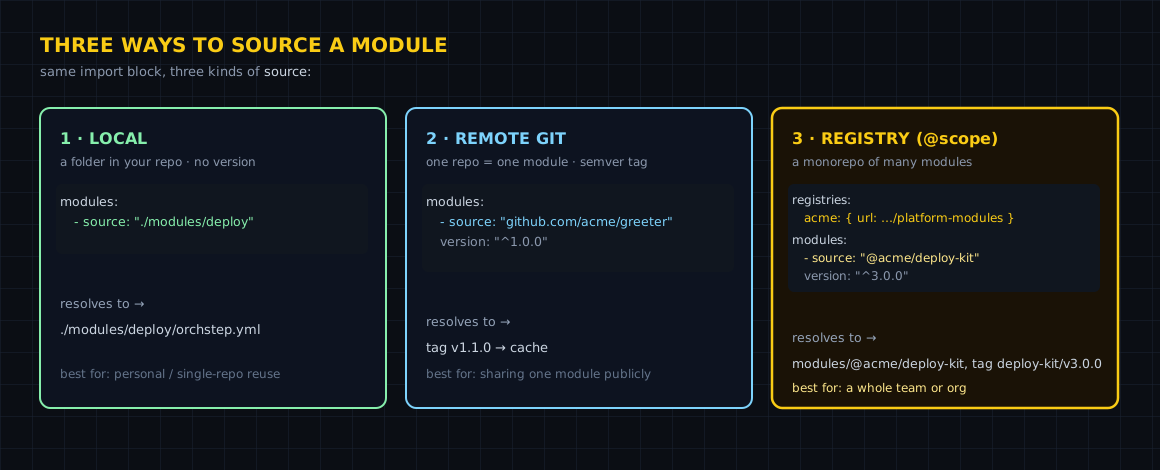
Import by reference, not by copy
A workflow imports modules in a top-level modules: block. Each import gets a local name: alias and a source:. For a single-module repo — one where the module's files live at the repo root — the source is just the Git URL, and version: is a semver constraint.
name: consume-remote-module
desc: "Import a versioned module straight from a Git repo and call its exported task."

modules:
  - name: greeter
    source: "github.com/orchstep/test-module-single"   # tags: v1.0.0, v1.1.0, v2.0.0
    version: "^1.0.0"                                   # resolves to v1.1.0

tasks:
  # `orchstep run hello`
  hello:
    desc: "Call the remote module's exported task"
    steps:
      - name: greet
        module: greeter          # the alias from modules:
        task: hello              # an exported task
        with:
name: "OrchStep"Three things to notice in the step:
module: greeteris the alias you declared above, not the repo name.task: hellois an exported task of that module.module:andtask:are separate keys — a dottedtask: greeter.hellois invalid.with:passes the task's parameters.
Run it
orchstep run helloThe first run does the resolution and fetch for you:
🔍 Resolving 'greeter' version ^1.0.0 from https://github.com/orchstep/test-module-single
📦 Resolved 'greeter' → v1.1.0 (tag: v1.1.0, commit: 8638d85ce4e0)
📦 Cached at: /Users/you/.orchstep/cache/modules/github.com/orchstep/test-module-single/v1.1.0
📦 Loaded module 'greeter' from 'github.com/orchstep/test-module-single'
🔒 Wrote orchstep.lock (1 module(s) pinned)
Workflow: consume-remote-module
Task: hello
  Step: greet
  $ echo 'Hello, OrchStep! (v1.1.0)'
Hello, OrchStep! (v1.1.0)
  [ok] greet
Result: successThe repo has tags v1.0.0, v1.1.0, and v2.0.0. Your ^1.0.0 constraint means "the newest 1.x", so it picked v1.1.0 and skipped the breaking v2.0.0. The fetched copy lands in ~/.orchstep/cache/modules/, keyed by repo path and version, so the second run is offline-fast.
Look before you import
You do not have to read someone's tags off a webpage. module info prints the Git URL and every available version:
orchstep module info github.com/orchstep/test-module-singleModule: github.com/orchstep/test-module-single
Git URL: https://github.com/orchstep/test-module-single
Available versions:
v1.0.0
v1.1.0
v2.0.0module resolve answers the next question — "given my constraint, which one do I actually get?":
orchstep module resolve github.com/orchstep/test-module-single ^1.0.0
# Resolved: v1.1.0 (tag: v1.1.0)And module search finds modules in the public registry by keyword, while module install warms the cache ahead of a run (handy in CI bootstrap):
orchstep module search git-checkout
# @community/github_action_git-checkout  v1.0.0  Clone Git repos and checkout refs ...  [community]

orchstep module install github.com/orchstep/test-module-single@v1.0.0Choosing a version constraint
The version: field is a standard semver range. Pick the one that matches how much you trust the upstream to honor semver:
| Constraint | Matches | You get |
|---|---|---|
1.1.0 | exact only | 1.1.0, forever |
^1.0.0 | >=1.0.0 <2.0.0 | newest 1.x (here 1.1.0) |
~1.0.0 | >=1.0.0 <1.1.0 | newest patch of 1.0 |
>=1.0.0 | minimum | newest tag, including 2.0.0 |
* | any | the highest tag |
^1.0.0 is the sane default: you get bug fixes and features, but a major bump (2.0.0) never sneaks in behind your back.
What you gained
| Concern | Copy-paste | Remote module |
|---|---|---|
| One source of truth | four diverged copies | one repo, imported by reference |
| Upgrades | edit every repo | bump the version: constraint |
| "What version am I on?" | read the diff | module info / module resolve |
| Offline + repeatable | re-clone by hand | cached in ~/.orchstep/cache |
| Trust boundary | none | semver range you control |
The honest boundary
A module is worth it when a task block is shared across repos or teams, or when its logic is gnarly enough to deserve its own tests and tags. If a task lives in exactly one workflow and always will, leave it inline — importing it from a Git repo is pure overhead. And remote fetching uses anonymous Git, so the source repo has to be reachable without credentials (public, today).
One more thing: that orchstep.lock the first run wrote is not incidental. It pins the exact commit and content hash behind the tag, which is what makes the resolution reproducible for your teammates and CI. That is its own post — see the lockfile link below.
Where to go next
- Using Modules — every source form, the CLI, and
with:parameters - Registry & Scopes — how
@scopesources and the cache resolve - Reproducible modules with the lockfile — pin the commit + hash
- Modules, end to end — the concept tour
Have a task block living in four repos? Move it into one, tag it v1.0.0, and import it. The shape above is the whole consumer side.
curl -fsSL https://orchstep.dev/install.sh | sh