Grow a workflow into a real project: task files, environments, and a live graph
One orchstep.yml is great until it isn't. Here's how to split a workflow into discoverable task files and external environments — without losing the single-command UX or the live run graph.
serve-task-callsA single orchstep.yml is the right way to start. You get ordered steps, real variables, retries as syntax, and a dry-run — all in one file you can read top to bottom.
Then it grows. The build task picks up a packaging step. Deploy splits into staging and production. Someone adds tests. Six months later that one file is 300 lines, three people edit it on the same afternoon, and every code review touches the whole thing because everything lives in one blob.
The instinct is to reach for the same escape hatch as always: a scripts/ folder full of small files that shell out to each other and lose all the structure you came for. The better move is to split the workflow as a workflow — task files OrchStep discovers on its own, environments in their own directory — while keeping the single-command UX. orchstep run pipeline still runs the whole thing. The live graph still descends into every called task.
The pain: one file, three editors
Here's the shape everyone hits. It works, but it's one merge conflict waiting to happen:
name: pipeline-demo
tasks:
  pipeline:
    steps:
      - { name: compile, func: shell, do: '...' }
      - { name: package, func: shell, do: '...' }
      - { name: unit, func: shell, do: '...' }
      - { name: integration, func: shell, do: '...' }
      - { name: push_staging, func: shell, do: '...' }
      - { name: push_prod, func: shell, do: '...' }
# ...and the environment values hard-coded inlineNothing here is wrong. It's just undifferentiated. Build, test, and deploy are three concerns living in one task, and the staging-vs-production decision is tangled into the same list. You can't run "just the build." You can't tell at a glance what pipeline actually does. And the environment values — region, monitoring, target cluster — are baked into the steps that use them.
The grown-up layout
Same workflow, split into a project. The top orchstep.yml is now a table of contents: it calls task files that OrchStep discovers under tasks/, and pulls environment values from environments/. Click through every file.
name: pipeline-demo
desc: A pipeline that CALLS auto-discovered task files (tasks/), with external env config — the LIVE graph descends into each called task and lights up the whole chain.
env_config:
  env_dir: environments        # environments/ files (defaults / group / group-env)
dotenv:
  - common.env
tasks:
  pipeline:
    desc: build → test → deploy (staging or production by env), each step a CALLED task file.
    steps:
      - { name: do_build, task: build }
      - { name: do_test,  task: test }
      - name: gate
        desc: production tier deploys to production; otherwise staging
        if: '{{ eq vars.tier "production" }}'
        then: [ { name: deploy_prod,    task: deploy-production } ]
        else: [ { name: deploy_staging, task: deploy-staging } ]
      - { name: announce, func: shell, do: 'echo "pipeline done: {{ vars.version }} → {{ vars.target }}"' }
  smoke:
    desc: A quick standalone task (no task calls).
    steps:
- { name: ping, func: shell, do: 'echo "ok"' }That's the whole project. Eight files, each one small enough to read in ten seconds, and a top-level file that reads like an outline of what happens.
What's actually going on
Auto-discovered task files. Anything under tasks/ is a task, named by its name: field — flat (tasks/build.yml → build) or nested (tasks/deploy/production.yml → deploy-production). You don't register them anywhere. Drop a file in, and orchstep run <name> finds it. The nested folder is just for your own sanity: deploy variants live together under tasks/deploy/. See Task Files.
Calling tasks as steps. Inside pipeline, each step is a task: reference, not inline shell:
- { name: do_build, task: build }
- { name: do_test, task: test }do_build calls the build task. That's the composition primitive — one task as a step inside another — and it's what lets the live graph descend into the called task instead of treating it as one opaque step. More in Composing Tasks and Using Modules.
The if/then/else gate. The one branching decision lives in exactly one place:
- name: gate
  if: '{{ eq vars.tier "production" }}'
  then: [ { name: deploy_prod,    task: deploy-production } ]
else: [ { name: deploy_staging, task: deploy-staging } ]When tier is production, the pipeline calls deploy-production; otherwise it calls deploy-staging. The decision is data-driven — and where does tier come from? The environment.
External environments (env_config). Instead of inline blocks, the values live in environments/, layered by filename:
defaults.yml— always loaded (version,tier: staging,region).<group>.yml—nonprod.yml/prod.ymlset group-wide values likemonitoring.<group>-<env>.yml—nonprod-staging.yml/prod-production.ymlset the specific target.
You pick the full environment with one flag. --env prod-production loads defaults.yml, then prod.yml (monitoring: full), then prod-production.yml (tier: production, target: prod-cluster). That flipped tier to production, which flips the gate to the prod branch. One switch, everything moves together. Full model in Environments.
dotenv. dotenv: [common.env] loads OS env vars (here LOG_LEVEL=info) before anything runs — the same .env file your other tooling already reads.
Run it
The single-command UX survives the split. The top file is still the entry point:
orchstep run pipeline --env prod-productionTask: deploy-production
Step: push
$ echo "pushing 3.0 to prod-cluster"; sleep 1
pushing 3.0 to prod-cluster
[ok] push
Step: announce
$ echo "pipeline done: 3.0 → prod-cluster"
Result: successSwitch the whole thing to staging by changing one token:
orchstep run pipeline --env nonprod-stagingAnd before anything executes, preview the resolved plan — variables, the gate evaluation, and every called task expanded inline:
orchstep run pipeline --env prod-production --dry-runSTEPS
1. do_build [task call] executes
calls: build
1. compile [shell] executes
3. gate [if] executes
condition: {{ eq vars.tier "production" }} -> true
then [-> taken]
1. deploy_prod [task call] executes
calls: deploy-productionThe dry-run doesn't just list pipeline's four steps — it descends into build, test, and deploy-production, shows the gate resolving to true, and prints the exact commands. You can see the production path is taken before you take it.
Watch the live graph
Multi-file is where orchstep serve earns its keep. Run the same pipeline under the dashboard and the OrchStep Pipeline graph renders the whole call tree — pipeline at the top, descending into each called task file — and lights up node by node as the run progresses. A called task isn't a black box; you watch do_build open into compile → package, then the gate fork into deploy-production.
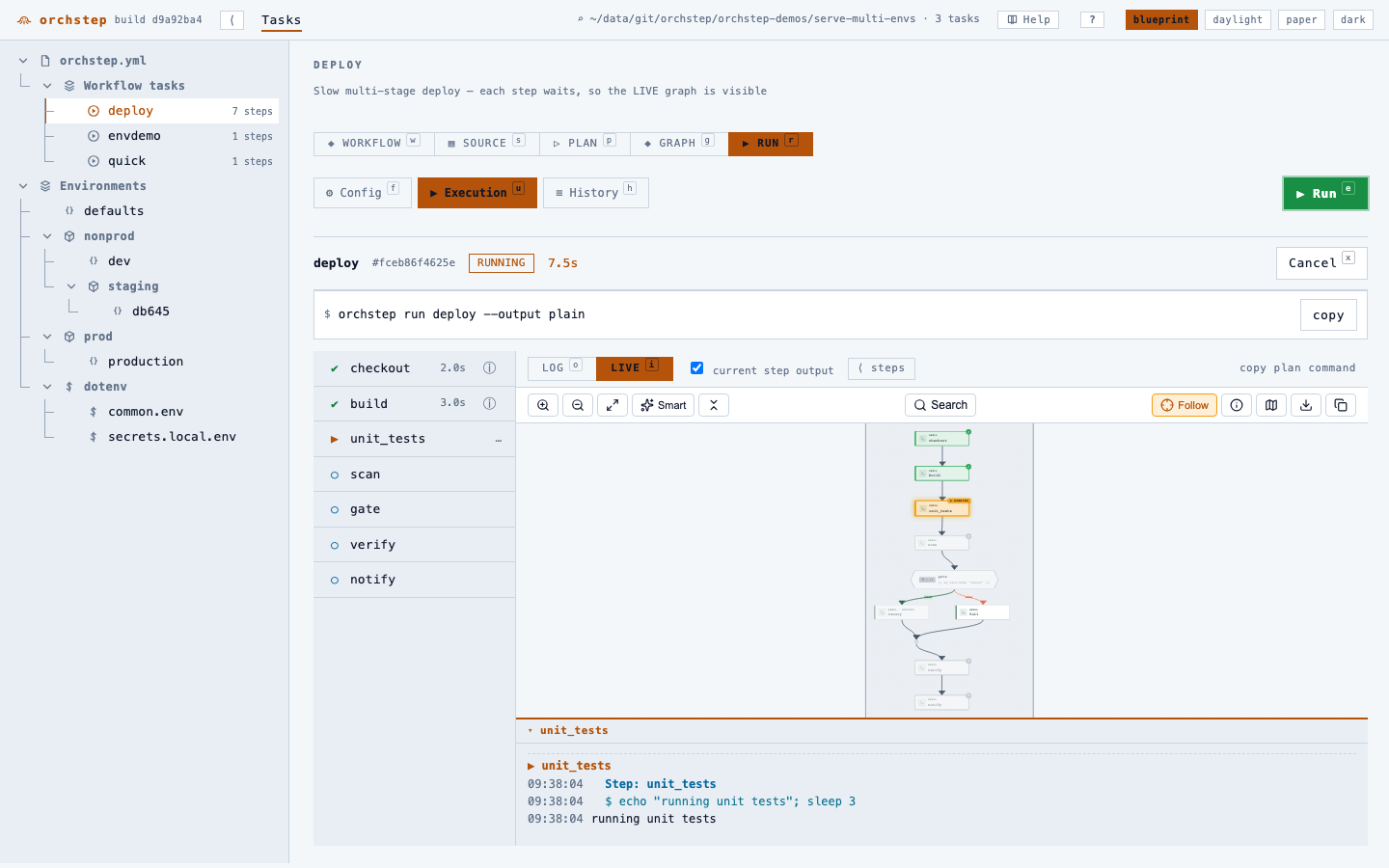
orchstep serve60-second tour: youtu.be/4xZm_ZmSC_g. Full walkthrough in The Web Dashboard.
What you gained
| Before (one file) | After (a project) |
|---|---|
300-line orchstep.yml, every review touches it | One file per concern; build and deploy reviewed independently |
| "What tasks exist?" → scroll and grep | Drop a file in tasks/, it's discovered — orchstep menu lists them |
| Environment values hard-coded inline | environments/ layered by file; values out of the steps |
| Switch envs → edit the steps | --env prod-production switches tier, target, and monitoring at once |
| Deploy step is one opaque blob | task: calls; the live graph descends into each one |
None of this changes how you run it. orchstep run pipeline is still the only command anyone has to remember. The split is for the humans reading and editing — the engine stitches the files back into one graph at runtime.
Where it isn't worth it
If your workflow is genuinely five steps and one person owns it, keep the single file. The project layout pays off when concerns multiply, when more than one person edits, or when you have real environments to switch between. Reach for it when one file stops being comfortable — not before.
Where to go next
- Task Files — how
tasks/discovery works, flat and nested - Composing Tasks — calling one task as a step in another
- Using Modules — sharing tasks across projects
- Environments — the layered
defaults / group / group-envmodel - The Web Dashboard — the live run graph for multi-file projects
This whole project is the serve-task-calls demo — orchstep lint passes, orchstep run pipeline --env prod-production runs anywhere (it's all echo). Try the layout on a workflow you've already outgrown.
curl -fsSL https://orchstep.dev/install.sh | sh