Local modules: reuse a task without leaving your repo
The lightest possible module is a folder in your own repo. No registry, no publishing, no Git URL — just source: "./modules/x" and you're sharing tasks across your workflows.
blog/org-module-registryThe word "module" makes people brace for ceremony — a registry account, a publish step, a version-tagging dance. None of that is required to start. The simplest module OrchStep supports is a folder in the repo you already have.
If you've got a deploy sequence your release task uses and your hotfix task also needs, you don't have to copy it. Move it into modules/deploy-kit/, point at it with source: "./modules/deploy-kit", and call it from both. Same workflow, one copy of the logic, zero infrastructure.
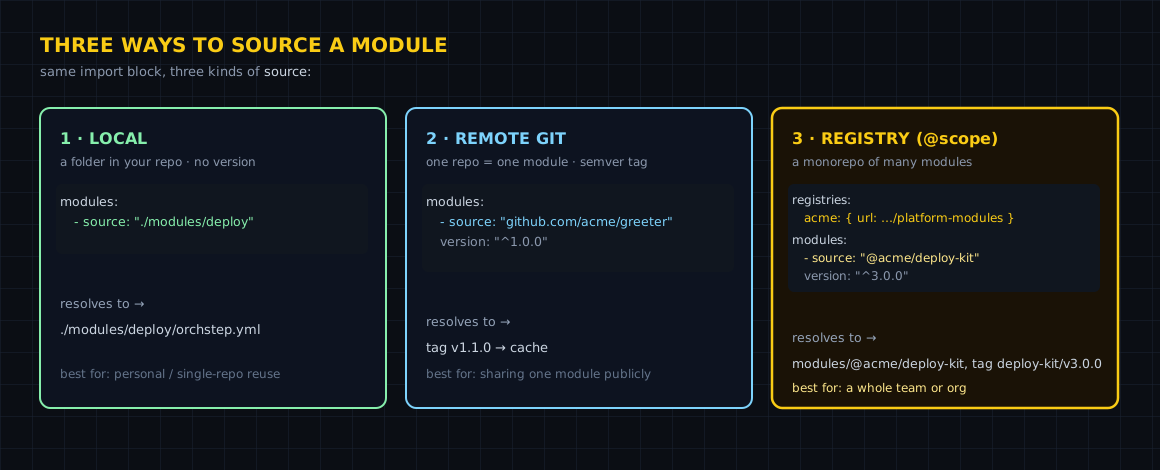
The shape: a folder with an orchstep.yml
A local module is just a normal workflow that happens to live in a subdirectory. No manifest required — that's only for published modules. Here's a repo with two local modules and a top-level workflow that uses them:
name: org-module-registry
desc: "Reuse shared task kits without leaving the repo."

# These resolve to folders in this repo, so it runs anywhere.
modules:
  - name: deploy
    source: "./modules/deploy-kit"
  - name: notify
    source: "./modules/notify-kit"

tasks:
  # `orchstep run release`
  release:
    desc: "Ship using shared, versioned task kits"
    steps:
      - { name: ship, module: deploy, task: rollout, with: { service: "checkout", target: "staging" } }
- { name: tell, module: notify, task: announce, with: { service: "checkout" } }Run it and both kits fire in order:
orchstep run release
# rolling out checkout to staging
# announced release of checkout
# Result: successThat's the entire setup. No orchstep module install, no cache, no Git fetch — the resolver sees a ./ path and reads the folder directly.
The three things that make it a call
Look at the top-level workflow again. There are exactly three moving parts:
- The
modules:block imports each folder and gives it a local alias (deploy,notify). source: "./modules/deploy-kit"is a relative path. Local sources take noversion:— there's nothing to resolve, it's right there in the repo.- A step calls an exported task with the separate
module:andtask:keys, passing params withwith:.
- name: ship
  module: deploy        # the alias from modules:
  task: rollout         # a task defined in deploy-kit's orchstep.yml
  with:                 # task params
    service: "checkout"
target: "staging"A couple of rules worth pinning down, because they're easy to get backwards:
module:andtask:are separate keys. A dottedtask: deploy.rolloutis invalid.- A local folder needs only an
orchstep.yml— a normal workflow. Theorchstep-module.ymlmanifest is for modules you publish, not for in-repo folders.
What you gained
| Concern | Two copies of the steps | A local module |
|---|---|---|
| Fix a bug in rollout | edit it in release and hotfix | edit modules/deploy-kit/ once |
| Setup cost | none | none — just a subfolder |
| Where the logic lives | scattered across tasks | one named folder per kit |
| Calling it | inline steps | module: + task: + with: |
| Path to sharing later | rewrite | add a manifest, tag, done |
The last row is the quiet payoff. A local module and a published module are the same shape — a workflow with tasks. When a second repo needs your deploy-kit, you don't rebuild it; you add an orchstep-module.yml manifest, push the folder to its own repo, and switch the source: from "./modules/deploy-kit" to a Git URL. Consumers change one line.
When a local module is overkill
If a task is only ever used by one other task in the same workflow file, just call it directly — OrchStep lets one task invoke another as a step (- { name: x, task: build }) with no module wrapper at all. Reach for a local module when you want a named, self-contained kit with its own defaults: and its own folder — typically a deploy, notify, or validation bundle that more than one task leans on. Below that bar, plain task-to-task calls are lighter.
Where to go next
- Using Modules — every source form, with runnable examples
- Modules Overview — local, Git URL, and registry sources side by side
- Composition — calling tasks across workflows and modules
- Creating Modules — when you're ready to publish a local kit
Got a task you've already copied once? Move it into modules/ and point both callers at the folder. Start with Using Modules.
curl -fsSL https://orchstep.dev/install.sh | sh