What an OrchStep module really is
A module isn't a plugin or a magic import — it's a packaged, versioned kit of tasks. Here's the anatomy: a manifest that declares the contract, and a workflow that implements it.
You've got a deploy sequence — build, push, roll out, announce — that three of your repos need. So you copy orchstep.yml into each one. Then the rollout step changes, and now you're editing the same fix in three places and hoping you didn't miss one.
A module is the fix for that. But it's worth being precise about what it is, because "module" is an overloaded word. An OrchStep module is not a plugin, not a binary, not a magic import. It's a packaged, versioned kit of tasks distributed over Git. You write the tasks once, tag a version, and import them by name — ^1.2.0, not "copy-paste and pray."
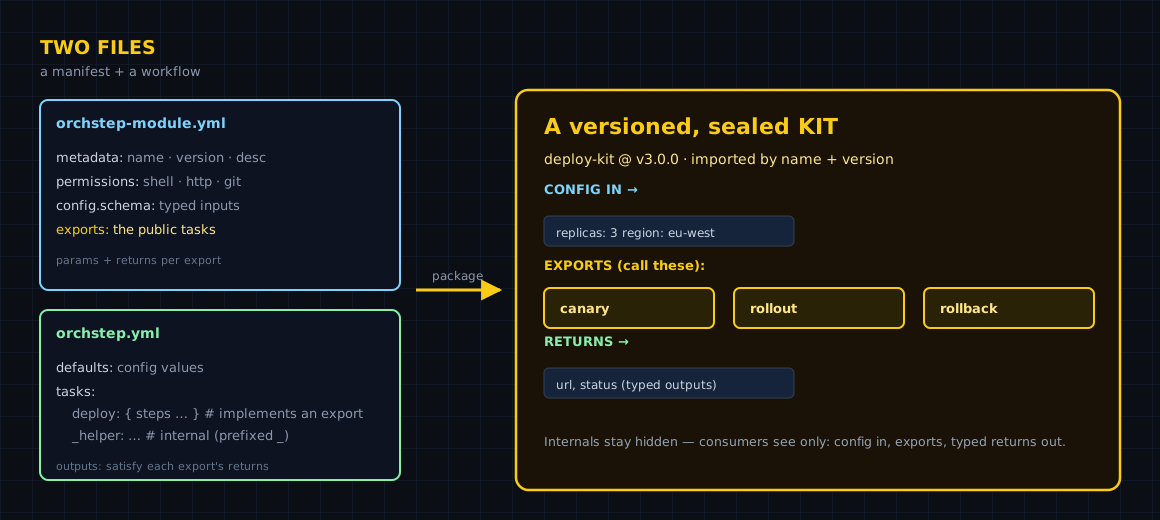
Two files, two jobs
Every module is a directory with two files that do very different things:
metadata:
  name: slack-notify
  version: "1.1.0"
  description: "Post a release announcement to a chat channel"
  author: "your-org"
  tags: ["notify", "release", "chatops"]

permissions:           # what the module is allowed to do
  shell: true
  http:
    allow: []          # allowed host patterns for func: http ([] = none)
  git: false

config:                # config the consumer may pass
  schema:
    properties:
      channel:
        type: string
        required: false
        default: "#releases"
        desc: "Channel to post to"

exports:               # the public tasks consumers can call
  announce:
    desc: "Announce a release to the team channel"
    params:
      - name: service
        type: string
        required: true
      - name: version
        type: string
        required: false
        default: "latest"
    returns:
      type: object
      properties:
        message:
type: stringThe manifest (orchstep-module.yml) is the contract. It declares the module's identity under metadata:, what it's allowed to do under permissions:, the config it accepts under config.schema:, and — the important part — the tasks it exposes under exports:. A consumer reads exports: the way you'd read a function signature: here's the task name, here are its params, here's what it returns.
The workflow (orchstep.yml) is the implementation. It's a perfectly normal OrchStep workflow — the same tasks: and steps: you'd write anywhere. Its job is to actually do the thing the manifest promises. defaults: hold the config values; tasks set outputs: to satisfy the returns: declared in the manifest.
That split is the whole idea. The manifest is the public API; the workflow is the private body. A consumer depends on the manifest and never has to read the workflow.
Calling it is one block plus one step
Once a module is published (we'll cover that in a later post), consuming it looks like this. You import it in a top-level modules: block with a local alias, then call an exported task with the separate module: and task: keys:
modules:
  - name: notify                                      # local alias
    source: "github.com/orchstep/test-module-single"  # the published repo
    version: "^1.0.0"                                  # a semver constraint

tasks:
  release:
    steps:
      - name: tell_the_team
        module: notify        # the alias
        task: announce        # an EXPORTED task
        with:                 # task params
          service: "checkout"
version: "2.4.0"Three things to internalize, because they're the rules people trip on:
module:andtask:are separate keys. A dottedtask: notify.announceis invalid.version:is a semver constraint —^1.0.0,~1.2.0,1.x, or an exact pin — resolved from the repo's Git tags.with:passes the task's params; aconfig:block on the import passes the module's config schema values.
What you gained over copy-paste
| Concern | Copy-pasted YAML | A module |
|---|---|---|
| Fixing a bug | edit every repo that copied it | bump the version once, consumers pull it |
| Knowing what it does | read the whole workflow | read exports: in the manifest |
| Upgrades | manual diff + merge | a semver constraint (^1.2.0) |
| Blast radius | "what depends on this?" is a grep | the manifest declares permissions: |
| Provenance | "which copy is current?" | a Git tag is the source of truth |
The manifest is what makes a module more than a shared file. It turns "here's some YAML, good luck" into "here's a versioned contract." That's the difference between a snippet and a dependency.
When a module is overkill
Don't reach for a module the first time you write a task. If a sequence lives in exactly one repo and nothing else will ever call it, a plain orchstep.yml is the right answer — wrapping it in a manifest just adds a file you have to maintain. Modules earn their keep at the second consumer: the moment you're about to copy a task into another repo, that's the signal to package it instead. Until then, a normal workflow is simpler and you lose nothing.
And you don't need to publish anything to a registry to get most of the benefit. The lightest possible module is just a folder in your own repo — that's the next post in this series.
Where to go next
- Modules Overview — the three source forms and the registry tiers
- Creating Modules — the full manifest format, field by field
- Composition — calling tasks across workflows and modules
- Modules (Learn) — the consumer-side mental model
Got a deploy or notify sequence living in three repos? Package it once. Start with Modules Overview.
curl -fsSL https://orchstep.dev/install.sh | sh