Publish a module: turn a task into a shareable package
You've got a task other people keep asking for. Here's how to wrap it in a manifest, validate it, tag a version, and let anyone import it with a single Git URL.
You wrote a task that does one thing well — clones a repo the right way, posts a release note, validates a JSON payload — and now three people have asked for it. You could keep pasting YAML into Slack. Or you could publish it once and hand them a source: line.
Publishing an OrchStep module is deliberately unglamorous: there's no account to create and no server to run. A single-module repo is just your two module files at the repo root, plus a Git tag. Anyone can import it by URL. This post walks the whole path — manifest, validate, tag — using the real public example repo github.com/orchstep/test-module-single.
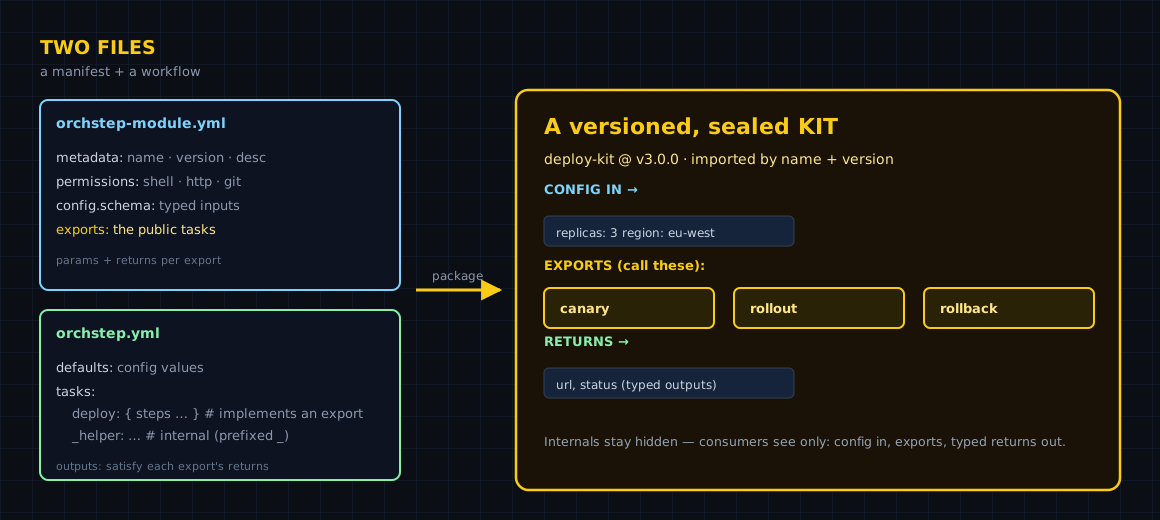
The layout: two files at the repo root
For a single-module repo, the whole repository is the module. Put orchstep-module.yml and orchstep.yml at the root, and that's it. Here's a complete, validate-passing module:
metadata:
  name: slack-notify
  version: "1.1.0"
  description: "Post a release announcement to a chat channel"
  author: "your-org"
  tags: ["notify", "release", "chatops"]

permissions:           # declare least privilege
  shell: true
  http:
    allow: []          # no outbound hosts allowed
  git: false

config:                # config consumers may pass on the import
  schema:
    properties:
      channel:
        type: string
        required: false
        default: "#releases"
        desc: "Channel to post to"

exports:               # the public API: tasks consumers can call
  announce:
    desc: "Announce a release to the team channel"
    params:
      - name: service
        type: string
        required: true
      - name: version
        type: string
        required: false
        default: "latest"
    returns:
      type: object
      properties:
        message:
type: stringTwo rules the validator will enforce, and people get wrong constantly:
- Identity fields (
name,version,description) live undermetadata:— not at the top level of the manifest. exportsandconfigare top-level keys, siblings ofmetadata:andpermissions:.
The workflow is a normal OrchStep workflow. Its tasks: implement what exports: promises, defaults: carry the config values, and each task's outputs: satisfy the export's returns:.
Validate before you tag
OrchStep ships a validator so you catch problems before a consumer does. Run it against the directory:
orchstep module validate ./✓ orchstep-module.yml valid
✓ orchstep.yml valid
Exports: [announce]Structural problems — missing manifest fields, an export with no matching task — are errors. Supply-chain concerns — dangerous shell patterns, non-HTTPS or internal URLs, oversized files — are warnings. Add --strict to promote the warnings to errors:
orchstep module validate ./ --strictThat's the same gate the registry applies to AI-submitted modules, so passing --strict is a good habit even for your own repos.
Tag a version — that's the release
There's no publish command for a public repo. A Git tag is the release. Single-module repos use plain vX.Y.Z tags:
git tag v1.0.0 && git push origin v1.0.0The real example repo, github.com/orchstep/test-module-single, carries three tags — v1.0.0, v1.1.0, and v2.0.0 — so you can watch semver resolution work for real. A consumer asking for ^1.0.0 gets v1.1.0 (the highest compatible 1.x), and is protected from the breaking v2.0.0:
modules:
  - name: greeter
    source: "github.com/orchstep/test-module-single"  # tags: v1.0.0, v1.1.0, v2.0.0
    version: "^1.0.0"                                  # resolves to v1.1.0

tasks:
  main:
    steps:
      - name: hi
        module: greeter
        task: hello
        with:
name: "OrchStep"When you ship a bug fix, tag v1.1.1; consumers on ^1.0.0 pick it up automatically. When you make a breaking change, tag v2.0.0; they stay on 1.x until they opt in. That's the contract semver buys you, and it's the entire reason to publish instead of paste.
What you gained
| Concern | A pasted snippet | A published module |
|---|---|---|
| Distribution | Slack message | source: + a Git URL |
| Versioning | "which copy?" | semver tags (^1.0.0 → v1.1.0) |
| Breaking changes | silently break everyone | a v2.0.0 tag nobody pulls by accident |
| The contract | implied | declared in exports: |
| Trust | read the YAML and hope | orchstep module validate --strict |
| Infra to run | none | none — Git is the registry |
Beyond a single repo
Two paths open up once you've published one module:
- Many modules, one repo. A monorepo layout hosts several modules under your own scope at
modules/@yourscope/<name>/, each tagged<name>/vX.Y.Z, consumed via aregistries:block. Good when you maintain a family of modules. - Private/internal modules. Module fetching is anonymous Git, so private repos aren't reachable through a URL source. For internal-only kits, OrchStep Pro adds a private registry (
orchstep module publish→@yourco/<name>) that keeps the same import ergonomics behind your own walls.
When publishing is overkill
If a task only ever runs inside one repo, don't publish it — keep it as a local module folder or a plain task. The cost of publishing isn't the tooling (there's barely any); it's the commitment to a stable contract. Once someone depends on your ^1.0.0, every change you make is a compatibility decision. Take that on when you have real consumers, not before.
Where to go next
- Creating Modules — the full manifest format and both repo layouts
- Using Modules — how consumers import, version, and lock your module
- Modules Overview — the three source forms and registry tiers
- Composition — calling module tasks from your workflows
Have a task people keep asking for? Add a manifest, run orchstep module validate ./, tag v1.0.0. Full format in Creating Modules.
curl -fsSL https://orchstep.dev/install.sh | sh