OrchShell: the ad-hoc command that already knows your environment
You keep a folder of wrapper scripts just to run helm and kubectl with the right per-environment values. orchstep do renders any command with your structured, layered config — objects and all — and runs it. dotenv++ for applications, no orchstep.yml required.
Every team has the folder. scripts/deploy-prod-eu.sh, scripts/deploy-prod-us.sh,
scripts/scale-staging.sh — a dozen near-identical wrappers whose only real job is to
remember the right values for one environment and shove them into one helm or
kubectl command. They drift. Someone updates the EU host and forgets US. The "config"
is smeared across bash.
The root cause is that dotenv only hands your process flat strings. The moment
your app config has structure — resources: { cpu, memory }, a list of hosts, nested
ingress settings — you flatten it into RESOURCES_CPU=…, RESOURCES_MEM=… and
reassemble it by hand downstream. The wrappers are that reassembly.
dotenv++ for applications
orchstep do runs any shell command or script with your OrchStep context already
filled in: {{ vars.X }} and {{ env.X }} resolved from your defaults, your
environment groups/environments (--env), and your dotenv — then it executes the
result and passes the real exit code through. Pointed at a folder of environment
files, that's OrchShell: dotenv++ for applications.
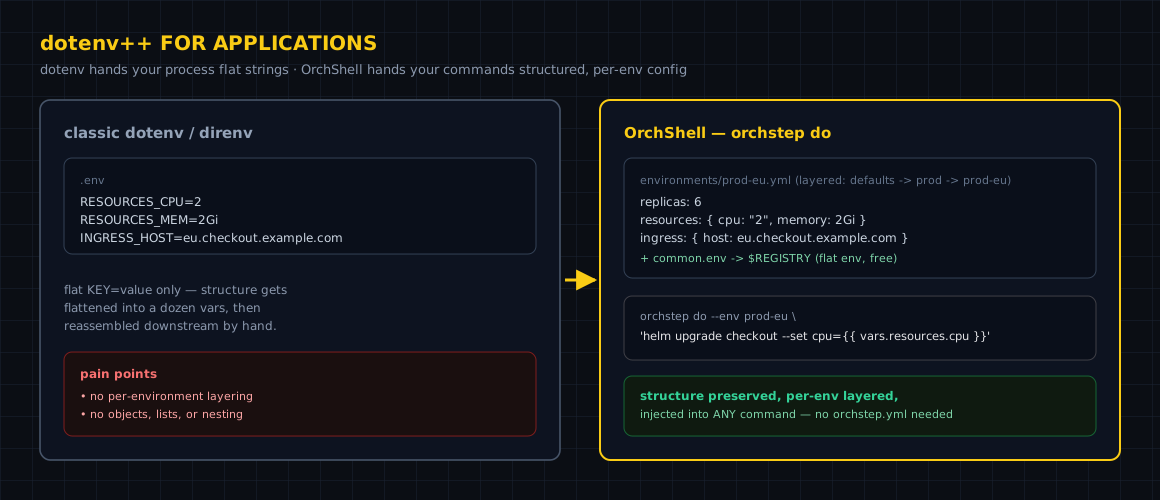
The difference is the right side of that picture. Your environment config stays structured and layered (defaults → group → environment), and your command references it directly:
orchstep do --env prod-eu 'helm upgrade checkout ./chart \
  --set replicas={{ vars.replicas }} \
  --set resources.cpu={{ vars.resources.cpu }} \
--set ingress.host={{ vars.ingress.host }}'Switch the whole thing to another region by changing one flag — --env prod-us — and
the same command resolves that environment's values. The dozen wrapper scripts
collapse into one command plus a folder of environments/*.yml.
No orchstep.yml? Still works
Point orchstep do at a directory with no workflow file and it discovers the
ambient context: a conventional environments/ directory (rich per-environment
vars, including whole objects) and the dotenv your project config declares. So a repo
that just holds config can still drive context-aware commands:
orchstep do --env prod-eu 'echo deploying to {{ vars.ingress.host }}'
# deploying to eu.checkout.example.com(A bare .env is not auto-loaded — dotenv must be declared, so a directory you
didn't write can't slip env vars into the commands you run.)
Four ways to hand it a command
The same engine, four shapes — pick by the moment you're in:
-
Inline — the one-off:
orchstep do 'kubectl set image deploy/app app={{ vars.image }}'. -
Stdin / pipe — render and run a whole script:
cat deploy.sh | orchstep do --env prod. -
Script file with a shebang — make a runbook context-aware:
#!/usr/bin/env -S orchstep do --script echo "Deploying v{{ vars.version }} to {{ vars.region }}" kubectl set image deploy/app app={{ vars.image }}chmod +x deploy && ./deploy— teammates run it and it pulls the right values from the env config automatically. -
Interactive REPL —
orchstep do --env proddrops you into a stateful shell where{{ vars.db_host }},{{ vars.namespace }}and friends are already correct, andcd/export/multi-line constructs persist across lines like a real shell.
Look before you leap: --render
For anything destructive, render first — a context-aware envsubst that shows exactly
what will run without running it:
orchstep do --render --env prod 'flyctl deploy --image {{ vars.image }}'
# flyctl deploy --image registry/app:1.2.3This is the habit that replaces "comment out the command, echo it, eyeball it, uncomment." You see the fully-resolved command, then you run it.
The SRE case: prod inspection without the wrong context
The cost of the wrapper-script folder isn't just maintenance — it's the 2am incident
where someone runs a command against prod with staging's namespace because they
grabbed the wrong script. orchstep do --env prod gives you a shell where the
namespace, hosts, and image tags are already the prod ones, structured and layered
from the same files your deploys use. One source of truth for "what does prod look
like," usable interactively, in a script, in a shebang, or in CI:
orchstep do -f ci.orchstep.yml 'docker push {{ vars.registry }}/app:{{ vars.version }}'Secrets, by the way, resolve into the environment (referenced as $X), not rendered
into the command text — same model as a normal step, so --render won't print them.
Takeaways
- The wrapper-script folder exists because dotenv is flat. Keep your config structured and layered, and the wrappers disappear.
orchstep dorenders any command/script with your real per-environment context and runs it — bare output, real exit code.- It works with no
orchstep.ymlat all, discovering ambientenvironments/+ a declared dotenv. --renderfirst for anything you can't take back.
Full reference: Ad-hoc Commands and OrchShell.
curl -fsSL https://orchstep.dev/install.sh | sh