OrchStep as a program launcher
Every tool you run is a program plus a fistful of flags. Here are five ways to launch one with OrchStep — from raw CLI to interactive menu to the new saved run aliases — each more ergonomic than the last, and all built on the same workflow.
Strip away the marketing and almost everything you do at the terminal is the same shape: launch a program with the right arguments. kubectl apply with the right context. terraform apply with the right var-file. docker build with the right tag. The command is rarely the hard part — remembering the exact incantation, in the exact order, with the exact flags, every single time, is.
OrchStep is a workflow engine, but it's also, at its most basic, a very good way to launch a program. And it gives you a ladder of ways to do it — each rung trading a little setup for a lot less typing. This post climbs that ladder, from the rawest CLI call to the new saved run aliases that sit at the top.
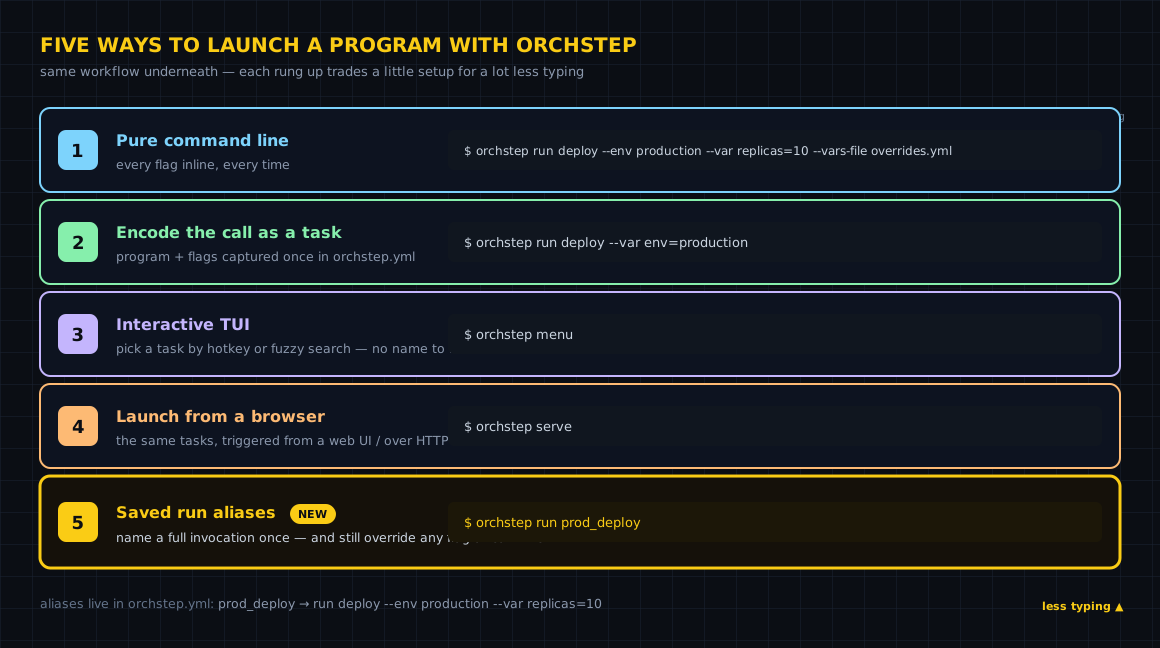
That picture is the whole post. Five rungs, same workflow underneath. Let's climb.
1. Pure command line, full args
The baseline. Every option goes inline, every time:
orchstep run deploy \
  --env production \
  --var replicas=10 \
  --vars-file overrides.yml \
--output jsonThis is maximally explicit and maximally powerful — nothing is hidden, you can see exactly what you asked for. It's also exactly what you'll be retyping at 5pm on a Friday, from memory, with one flag in the wrong place. Great for one-offs and for discovering the shape of a run. Miserable as a thing you do twenty times a day.
Everything below is a way to stop retyping this line.
2. Encode the call once as a task
The first real step up: stop remembering the program and its flags. Encode the call once — as a task in orchstep.yml — and run the task by name. The program, its arguments, and the variables it interpolates all live in one reviewable place.
name: launcher
# Defaults the task interpolates. Override any of them with --var.
defaults:
  env: staging
  replicas: "3"

tasks:
  # `orchstep run deploy --var env=production --var replicas=10`
  deploy:
    desc: "Roll out the api to a target environment"
    steps:
      - name: apply
        func: shell
        do: |
          kubectl --context {{ vars.env }} \
            set image deploy/api api=api:latest
      - name: scale
        func: shell
do: kubectl --context {{ vars.env }} scale deploy/api --replicas={{ vars.replicas }}Now the launch is just:
orchstep run deploy --var env=production --var replicas=10The kubectl invocation — its exact flags and ordering — is captured once. You supply only what changes. And because it's a real workflow, you get the engine for free: --dry-run resolves every variable and prints the plan without executing, so you can read the actual command before it runs. This is OrchStep's core model — the program call is now typed, previewable, and reusable instead of living in your shell history.
3. Interactive TUI: orchstep menu
You've encoded the call. Now you don't even want to remember its name. Launch the picker:
orchstep menuorchstep menu opens an interactive TUI — a task picker you drive with the keyboard:
- Press a task's hotkey to run it instantly.
- Press
/to fuzzy-search by name or description. - Press
fto cycle filters — all, a-z, public, internal. - Press
qto quit.
This is the rung for discovery and for humans. A new teammate doesn't need to know that the task is called deploy — they open the menu, type "roll out," and the fuzzy search finds it by its desc. Nobody greps the YAML to find out what's runnable; the menu is the index. And it refuses to hang when there's no TTY, so the same workflow stays safe to call non-interactively from CI.
4. Launch from a browser: orchstep serve
The terminal isn't the only surface. Run:
orchstep serveand OrchStep comes up as a local HTTP server with a web dashboard. The same tasks you'd run from the CLI become launchable from a browser — a "run" surface that doesn't live in a shell at all. It's the right rung when the person triggering the run isn't at a terminal: trigger a task from a UI, or wire it into something that speaks HTTP, while the workflow definition stays exactly the same orchstep.yml.
Think of serve as exposing your workflow so runs can be triggered from a UI instead of typed. Same tasks, same variables, different door. (The web dashboard.)
5. Saved run aliases — the new rung
Here's the new one, and the one that ties the ladder together.
A task captures the program and its flags. But a real launch is a task plus a specific set of options — deploy, yes, but to production, with 10 replicas, reading overrides.yml, emitting JSON. Encoding the task didn't save that whole invocation. Rung 1's long command was still the thing you typed to launch it.
Saved aliases close that gap. You name a full invocation once, then run it by name. Define an aliases: block in orchstep.yml:
name: launcher

aliases:
  # Typed form (recommended): every run option as a field.
  prod_deploy:
    desc: "Production rollout, 10 replicas, JSON output"
    task: deploy
    env: production
    vars:
      replicas: "10"
    vars_file: overrides.yml
    output: json

  # String shorthand: a raw command, a leading `orchstep`/`run` is tolerated.
  staging_deploy: run deploy --env staging --var replicas=3

  # Typed, pointing at a different workflow file and task.
  publish_release:
    desc: "Cut and publish a release from release.yml"
    file: release.yml
task: publishNow the launch is a name:
orchstep run prod_deployrun resolves prod_deploy to the alias and expands it into the full invocation. Two forms are accepted: the typed mapping above (fields like desc, task, file, env, vars, vars_file, output, json_file, stdin_var, dry_run), and the string shorthand — a raw command string, with a leading orchstep or run tolerated so you can paste from your history and barely edit it.
Why this beats a shell alias
Here's the part that matters. A shell alias — or rung 1 pasted into your dotfiles — is a frozen snapshot. The replica count is baked in; to change it you edit the alias. An OrchStep alias is an overridable default. Flags you pass at call time win:
orchstep run prod_deploy --var replicas=20 # replicas is now 20prod_deploy still supplies production, overrides.yml, and JSON output — you only stated the one thing that's different. The preset is a starting point, not a cage. That's the whole advantage: a saved invocation you can still steer.
orchstep run deploy \
  --env production \
  --var replicas=10 \
  --vars-file overrides.yml \
--output jsonorchstep run prod_deploy
# still steerable — override just what changes:
orchstep run prod_deploy --var replicas=20Inspect and keep them honest
Aliases are introspectable, so a saved name never becomes a mystery:
orchstep alias                # list every alias with its description
orchstep alias prod_deploy # show the resolved `orchstep run ...` commandAnd because an alias and a task share the orchstep run <name> namespace, a name collision would let an alias silently shadow a task. orchstep lint catches exactly that — it warns when an alias name collides with a task name, before the shadowing bites you.
The capstone
Aliases are the ergonomic top of the ladder, but they don't replace the rungs below — they sit on top of them. An alias is still a normal run, so everything you already know keeps working:
- Override at call time —
--var,--env, and friends layer on top of the saved defaults; the flag you pass always wins. - Preview before you launch —
orchstep run prod_deploy --dry-runresolves the alias and the whole task, then prints the plan without executing a thing. - Shared with the team — aliases live in the committed
orchstep.yml, so the shortcut travels with the repo instead of getting trapped in one person's dotfiles. - Kept honest —
orchstep aliasshows what a name expands to, andorchstep lintflags a name that would shadow a task.
Five rungs, one workflow. You start at the bottom typing the whole program and its flags by hand, and you end at the top typing a name — without ever giving up the explicitness, the preview, or the ability to override that made the bottom rung worth keeping.
Where to go next
- Quick Start — your first workflow in two minutes
- Variables & Outputs — the scoping model
--varplugs into - Previewing with Dry Run — read the plan before you launch
- The Web Dashboard — launch tasks from a browser
Got a 90-character command you paste from your shell history every day? Name it once in aliases:, run it by that name, and override only the flag that changes.
curl -fsSL https://orchstep.dev/install.sh | sh