Dry Run
Preview exactly what a task would execute - rendered commands, branch verdicts, variable provenance - without running anything
Available since v0.9.0.
--dry-run answers the question every operator asks before pressing enter
on deploy or rollback: what exactly is this about to do? It builds a
plan of the task - every step with its rendered command, every
condition with a verdict, every variable with the precedence layer
that won - and executes nothing.
orchstep run deploy --dry-run
orchstep run deploy --dry-run --env production --var version=2.0.0
orchstep run deploy --dry-run --output json # machine-readable planThe plan is built with the engine's own template and expression pipeline - the same code paths a real run uses - so what you see is what would run.
The one hard problem, and how it is handled
A step's command may reference the output of an earlier step
(steps.build.image_tag), which cannot exist without running the build.
Dry-run never guesses: values that only exist at runtime render as visible
placeholder tokens, and conditions that depend on them are marked
runtime-decided with all branches shown.
A real plan against a deploy pipeline:
DRY RUN  workflow=payments-deploy  task=deploy  env=production
         Build, push, roll out

VARIABLES (winning layer)
  app         = payments  (defaults)
  mode        = standard  (defaults)
  notify_list = ["alice","bob"]  (defaults)
  registry    = registry.prod.internal  (environment)
  replicas    = 6  (group)
  version     = 2.0.0  (runtime)

STEPS
   1. build  [shell]  executes
        | docker build -t payments:2.0.0 .
        outputs: image_tag
   2. push  [shell]  executes
        | docker push registry.prod.internal/⟨steps.build.image_tag⟩
        retry: up to 3 attempts, interval 2s
        runtime-only: steps.build.image_tag
   3. gate  [if]  runtime-decided
        condition: steps.push.status === "success"  -> runtime (depends on step outputs)
        then [decided at runtime]
           1. rollout  [shell]  executes
                | kubectl scale deploy/payments --replicas=6
        else [decided at runtime]
           1. alert  [shell]  executes
                | echo "push failed for payments"
   4. mode_gate  [if]  executes
        condition: {{ eq vars.mode "canary" }}  -> false
        then [skipped]
           1. canary  [shell]  skipped
        else [-> taken]
           1. full  [shell]  executes
                | echo full rollout 2.0.0
   5. notify_each  [shell]  executes
        loop: items: {{ vars.notify_list }} -> 2 iteration(s)  [alice bob]
        | echo "notify ⟨loop.item⟩ about 2.0.0"

FINALLY (always, after the steps)
   1. cleanup  [shell]  executes
        | rm -f deploy.lock

SUMMARY  10 steps, 8 execute, 1 skipped, 1 runtime-decided; 1 value(s) known only at runtime (shown as ⟨name⟩)
No steps were executed.Reading it:
- Variables are fully known before execution - the whole 7-layer merge
(defaults, group, environment, module config, task, step,
--var) resolves at plan time, and each value shows which layer supplied it. This doubles as a precedence debugger. ⟨steps.build.image_tag⟩is a runtime-only value - the command is shown with the placeholder embedded, never a guess.gatedepends on a step output, so it is runtime-decided: both arms are displayed, neither greyed out.mode_gatedepends only on variables, so it gets a real verdict:false, thethenarm and everything inside it marked skipped, theelsearm marked taken.- Loop items come from variables, so the loop expands at plan time
(2 iterations, items previewed); the body renders once with
⟨loop.item⟩. - Task-level
catch:andfinally:sections are listed separately with their trigger semantics.
JSON output
--output json emits the same plan as a structured document - for CI
gates, plan diffing, and tooling:
orchstep run deploy --dry-run --output json | jq '.summary'{
"total_steps": 10,
"executes": 8,
"skipped": 1,
"runtime_decided": 1,
"delegates": 0,
"prompts": 0,
"unknown_values": 1,
"errors": 0
}Each step carries effect (executes / skipped / runtime-decided /
delegates / prompts / error), the rendered command, recorded
unknowns, condition verdicts per branch, and loop expansion. Variables
carry their winning source layer.
The visual plan (--output html)
orchstep run deploy --dry-run --env production --open--output html (or just --open, which implies it) writes
orchstep-plan-<task>.html - a self-contained, offline visual plan and
opens it in your browser. No server, no network access, no dependencies:
the viewer is embedded in the orchstep binary, and the plan data (which
contains your real commands and variable values) never leaves the machine.
Try it live: open the example plan (new tab) - the unmodified file this command wrote against the tutorial workflow, tabs, themes and all.
Or the big one: a four-layer release pipeline - 31 planned steps across
release→build_and_verify→publish_artifacts→_record_metrics, a release-type switch, an if/elif/else rollout strategy, a runtime-decided health gate, loop matrices, a parallel announce fan-out, and the catch/finally rollback path (source on GitHub).
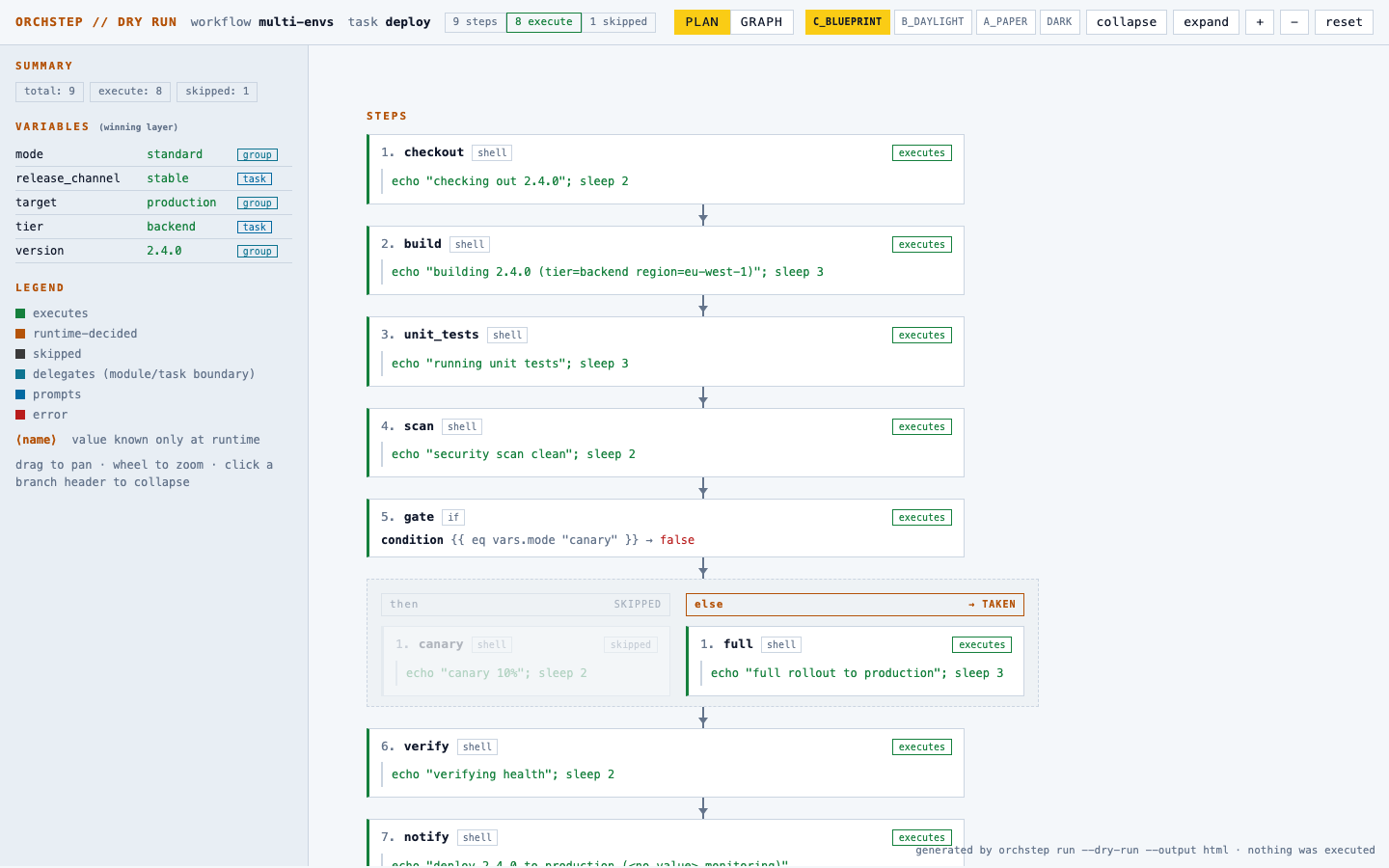
The diagram is the plan, not just the workflow shape:
- node bodies show the rendered commands with runtime-only values as highlighted placeholder chips;
- branch lanes carry their verdict - TAKEN solid, SKIPPED dimmed, RUNTIME amber-dashed with the deciding expression;
- effect badges per node (executes / skipped / runtime-decided / delegates / prompts / error), loop expansion inline;
- the sidebar lists every variable with its winning precedence layer and the plan summary.
Drag to pan, scroll to zoom, click a branch header to collapse it. The page has the same four color themes as this docs site - C_BLUEPRINT / B_DAYLIGHT / A_PAPER / DARK buttons in the header, remembered per browser. For very long or deeply nested plans, collapse / expand buttons fold every branch at once.
The GRAPH tab
The same page has two tabs. PLAN is the lane view above; GRAPH renders the identical plan as the interactive graph from the workflow visualizer - React Flow, embedded right inside the file, still fully offline:
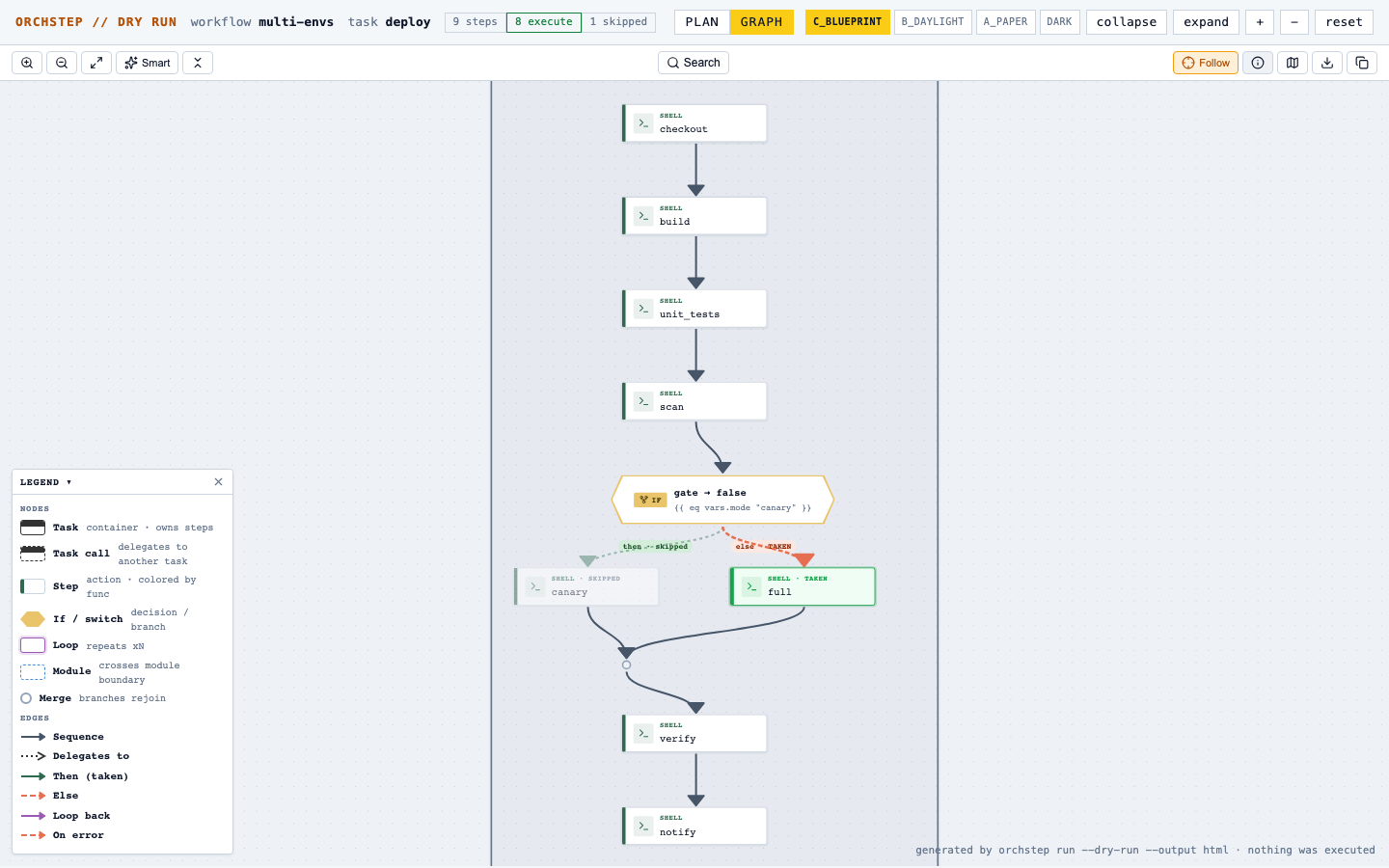
Branch edges carry their verdicts (then · skipped, else · TAKEN,
runtime-decided arms in amber), skipped steps are suffixed, loops get
badges - and the graph follows the page's theme switcher live. Use GRAPH
for the shape of the run, PLAN for reading every rendered command.
You can also paste plan JSON (from --output json) into the
visualizer's editor - it detects plan documents and switches
to plan mode.
What dry-run also catches
Because every do: and args: template is actually rendered, a plan
surfaces template errors before anything runs - a misspelled function
or unparseable expression shows up as an error step in the plan instead
of a mid-run failure halfway through a deploy.
Behavior notes
- Plain function steps,
if/elif/else,switch/case, loops,parallel, local task calls (task:steps are descended into, withwith:parameters applied), and task-levelcatch:/finally:are all planned. - Module calls are descended too (v0.9.0+): the plan resolves the
loaded module's task with engine-faithful scoping - the module's own
defaults:, the import'sconfig:overrides, renderedwith:parameters, isolated step outputs. This works through nested modules (a module importing another module), so a plan can show every layer of a platform stack: live three-layer example (source on GitHub). Unresolvable modules remaindelegatesboundary nodes; module-internal taskcatch:/finally:sections are not yet planned. transformscripts are shown as written - the engine never template-renders transform JavaScript, so the plan does not either.promptsteps are markedprompts(pre-answer them with--var <step_name>as usual).- Dry-run does not read stdin, so it is always safe in pipes and CI.
Pairs well with orchstep eval - eval answers
"what is this expression worth right now", dry-run answers "what would
this whole task do".